
Written by: Paul Foster, Founder, CEO, OnePlan
Key Takeaways
- Venue planning software in 2026 falls into two clear categories: booking and CRM tools for reservations, and spatial site-layout platforms for accurate, to-scale infrastructure placement on live maps.
- Traditional manual tools like PowerPoint, Excel, and Google Maps lack geo-accuracy, which causes costly on-site adjustments, while complex CAD software is too technical and expensive for most event teams.
- True spatial site-layout platforms solve critical operational challenges by providing crowd capacity calculators, traffic flow tools, real-time collaboration, and auto-generated Bills of Quantities for procurement and permitting.
- Key evaluation criteria include to-scale accuracy on live maps, multi-user collaboration, crowd and traffic calculators, inventory exports, ease of use for non-engineers, and accessible pricing with a free entry point.
- OnePlan bridges this gap as an accessible yet precise spatial planning platform, and you can book a demo today to see how it transforms your venue planning workflow.
How Venue Planning Software Works in 2026
Booking and CRM platforms manage reservations, contracts, invoicing, and client communications. They excel at those tasks, but they do not confirm whether a 40-by-60-foot tent fits in the north parking lot or whether crowd flow from Gate 3 creates a bottleneck at the first-aid station. Spatial site-layout tools handle that spatial work. They place every object on a geo-accurate, to-scale map so the plan reflects physical reality before a single stake goes in the ground. OnePlan sits in that second category and remains accessible to non-engineers. Most venue professionals have tried to fill this gap with PowerPoint, Excel, Canva, Photoshop, Google Maps, or internal static, top-view screenshots and plan files.
Book a 15-minute demo to see how OnePlan handles spatial planning for your venue, or get started free with your first event on us.
The Core Problem of Fragmented Planning
This gap between booking tools and spatial planning creates real operational consequences. According to OnePlan's 2026 Event Site Planning Report, 71% of event professionals rank attendee safety and security as their top priority when planning a site. More than 1 in 3 name crowd safety and flow as their single biggest challenge, and 44% say accurate measurements and layouts are critical to success. A further 1 in 3 identify stakeholder communication as the most stressful part of the job.
These numbers describe a daily reality that most venue operations teams recognize immediately. Plans built from screenshots and shapes in PowerPoint are not to scale, so objects that look fine on screen do not fit on the ground. Files get emailed back and forth, versions multiply, and by event day, security is working from a different map than operations. Casey Joyce, Director of Fitness and Events at Special Olympics Virginia, put it directly: "We worked in silos and there was low visibility across departments or teams or areas of responsibility, and we were all using different tools, Photoshop, Illustrator, InDesign."
Why Traditional Planning Tools Fall Short
Manual tools such as PowerPoint, Excel, Canva, Photoshop, Google Maps, and static screenshots are familiar and often free, but none of them are to scale. Simon Stewart, Director of the Cheese & Chilli Festival, described the consequence: "With the software we were using before, the ability to scale wasn't great. We couldn't rely on it to be accurate and we would often get to site and have to make changes to layout due to plans not being to scale." The Jockey Club's event team had a similar experience. They said, "We used to plan events with images and screenshots that we'd put into PowerPoint, and add red and white lines over. We'd take an aerial photo from the previous year, then plotted things over it. It was very basic."
At the other extreme, CAD and engineering software such as AutoCAD, Bluebeam, and Revit deliver precision but were built for technical drafters. Silverstone previously relied on AutoCAD and Google Maps, producing plans that were only as current as the last exported PDF. The Tour of Britain depended on local authorities submitting DWG files that took weeks to turn into usable plans, with constant CAD back-and-forth. Elise Fazzari, Senior Producer at Mosaic, noted, "OnePlan makes planning easier, quicker, and more accurate. It definitely saves time and is less expensive than contracting a CAD designer."
What To-Scale Venue Planning Software Solves
A true spatial site-layout platform replaces guesswork with a live, zoomable satellite or street map as the base canvas. Every object placed on it, including tents, stages, crowd barriers, portable toilets, generators, signage, and vehicles, stays accurately to scale as you zoom, which means the measurements on screen match the ground. That accuracy enables precise area and perimeter calculations the moment you outline a space. Those measurements then power standing crowd capacity tools that instantly show how many people any defined area can safely hold at a chosen density.
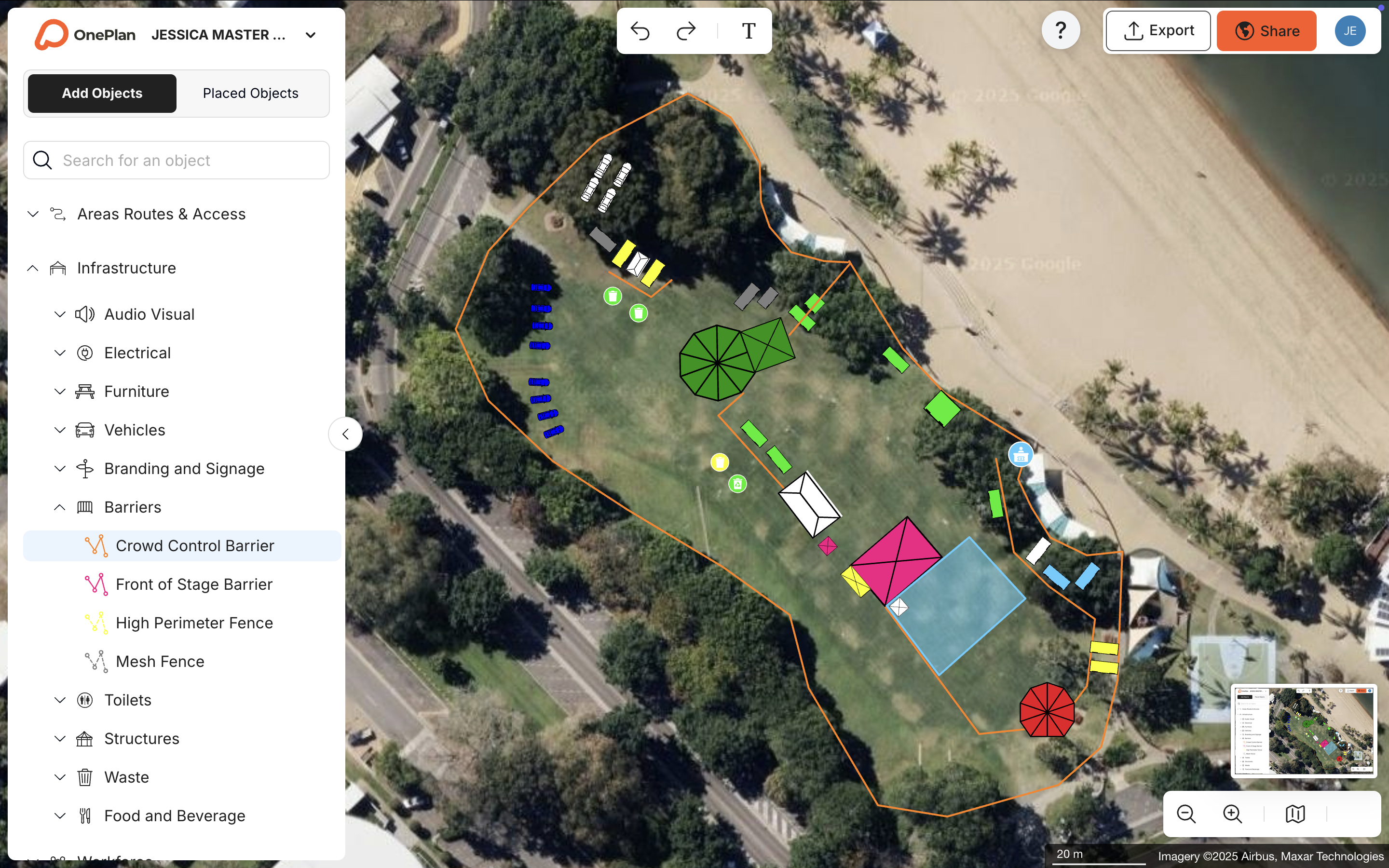
The same geo-accurate foundation supports traffic and parking calculators that model ingress and egress flow before anyone visits the site. An auto-generated Bill of Quantities turns the finished map into an exportable inventory for procurement and permitting. Real-time collaboration means every department, including operations, security, medical, traffic, and vendors, works in the same live plan instead of maintaining separate versions. Columbus Crew's Director of Guest Experience, Michael Beirne, described the shift: "We were looking to overcome old maps, a lack of collaboration, and the struggle of having data in too many places. With OnePlan, we've brought it all together in one system" and they cut planning time by 40%.
How to Evaluate Venue Planning Software
- Accuracy: Every object should stay to scale on a geo-accurate map at any zoom level, and you should measure distances and areas without visiting the site.
- Collaboration: Multiple departments and external stakeholders should edit or view the same live plan simultaneously, with role-based permissions.
- Crowd and traffic tools: The platform should calculate standing crowd capacity, parking, and ingress or egress flow instead of leaving those to guesswork.
- Inventory outputs: A finished map should automatically generate a Bill of Quantities that exports to Excel or CSV for procurement and permitting.
- Ease of use: An operations professional with no engineering background should be placing objects on a map within seconds of signing up.
- Pricing: There should be a free entry point for one-off or small events, with scalable paid tiers for teams and year-round venues.
Top Venue Planning Tools by Category
Booking and CRM platforms such as Tripleseat, Planning Pod, and Momentus excel at managing reservations, contracts, and client pipelines. They are the right choice when the primary need is calendar management and sales workflow. They do not provide to-scale spatial layouts, crowd calculators, or operational outputs like a Bill of Quantities.
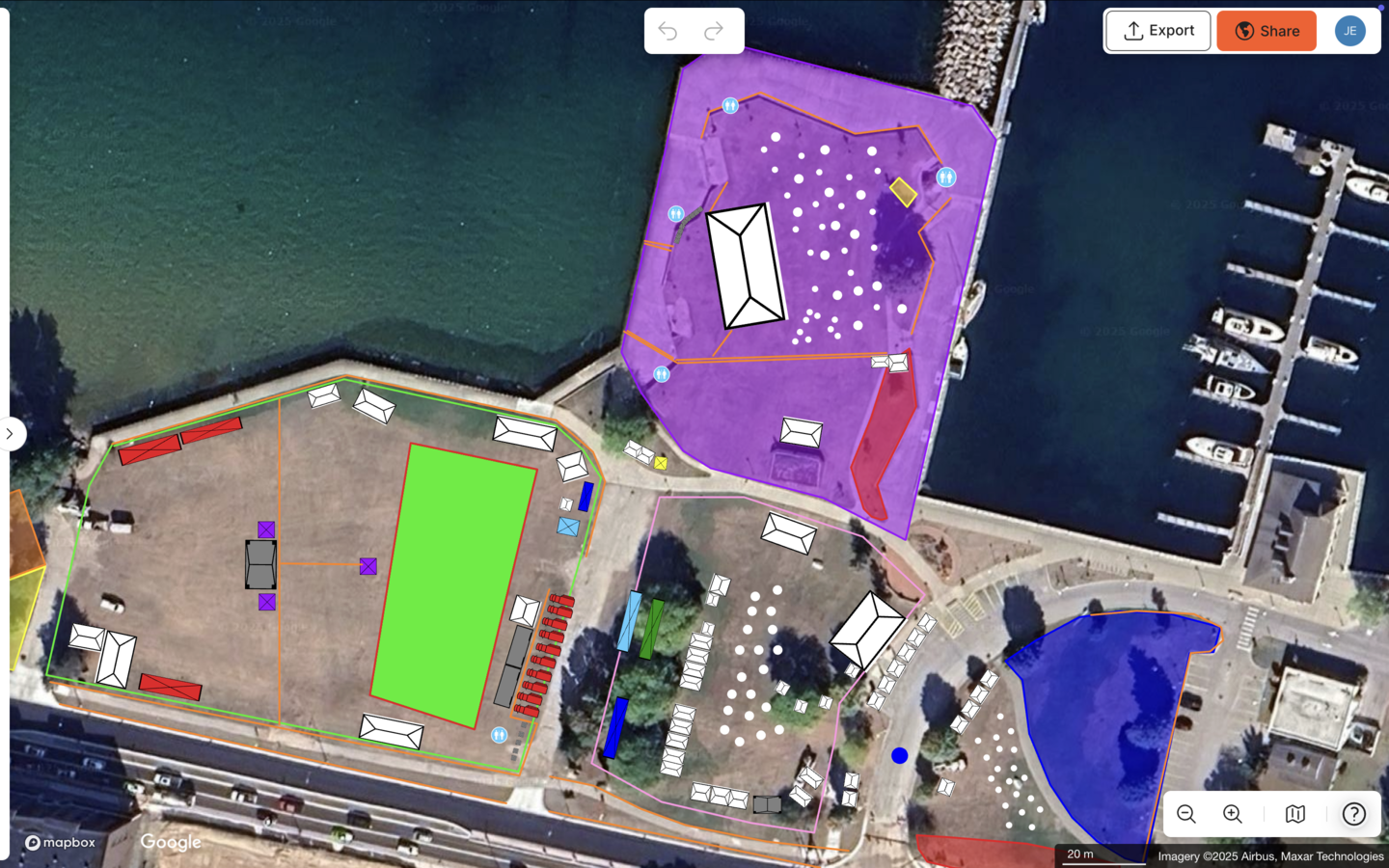
Spatial site-layout tools close the gap between manual tools and complex engineering software. OnePlan is purpose-built for this category. It is browser-based, drag-and-drop, and built on leading GIS mapping technology powered by Esri for pinpoint geo-accuracy. The results across customer types are consistent. Silverstone achieved a 13x ROI, a 10% reduction in planning days, and a further 5% in supplier efficiencies across 9,000 contractors. The Tour of Britain cut site visits by 75%, saved more than 300 hours a year, and achieved a 3x ROI. Eagle Mountain City reduced planning time by 70%, going from 8–10 hours down to a few hours per event, and reported a 5x ROI. SoulFest cut planning time by 85%, building almost its entire festival map within two days.
Decision Matrix for Venue Planning Software
| Criteria | Manual tools (PowerPoint, Google Maps, etc.) | Complex engineering software (CAD, AutoCAD) | Booking / CRM platforms | OnePlan |
|---|---|---|---|---|
| To-scale layout on a live map | No | Yes, but static exports only | No | Yes, geo-accurate at any zoom level |
| Ease of use for non-engineers | Yes | No, steep learning curve | Yes | Yes, drag-and-drop, start in seconds |
| Real-time multi-user collaboration | No | Limited | Varies (CRM-focused) | Yes, single source of truth for all departments |
| Crowd and traffic calculators | No | No | No | Yes, standing capacity, parking, ingress and egress |
| Auto-generated Bill of Quantities | No | No | No | Yes, exports to Excel or CSV for procurement |
| Free entry point | Yes (no spatial accuracy) | No, expensive licensing | Varies | Yes, first event free, up to 25 objects |
When Spatial Site-Layout Tools Beat Pure CRM Software
A booking platform is the right primary tool when the core workflow is managing client inquiries, contracts, and invoicing for a fixed indoor venue with a stable floor plan. Spatial site-layout software becomes essential when the event footprint changes between bookings or when crowd flow, ingress and egress, or standing capacity must be calculated and documented. It also becomes essential when multiple departments or external authorities need to work from the same plan, when infrastructure quantities must be ordered accurately, or when the venue spans outdoor areas, roads, or multiple levels.
The Beirut Marathon's Race Director explained the value clearly: "I can choose a location for a race that's not even nearby and start planning everything, measuring everything in OnePlan and see if the layout I want is feasible or not, before even doing a site visit." That kind of remote, accurate spatial validation sits outside the scope of any CRM platform.
Best Venue Planning Software for Small Events
Small events share the same spatial planning needs as large ones. Vendors must fit, crowd areas must be safe, and the fire marshal still needs a legible map, but budgets and teams are smaller. OnePlan's free first event, with up to 25 objects, covers the majority of small-event layouts without any payment required. As mentioned earlier, Eagle Mountain City's Events Manager achieved this same dramatic reduction by replacing separate maps for fire, police, and facilities with one comprehensive plan. The same tools that serve a community fair also scale to a 600,000-attendee festival, so teams do not need to switch platforms as events grow.
Best Venue Planning Software for Small Businesses
Small event businesses and agencies need low cost, fast onboarding, and the ability to produce professional outputs for clients and permitting authorities. OnePlan's paid plans start from around $75 per month per seat, with annual billing saving approximately 20%. There is no engineering background required. Simon Stewart of the Cheese & Chilli Festival noted that "OnePlan provides an accurate to-scale map and hundreds of items of event infrastructure that allows me to quickly build an event site" without specialist design skills. Reusable templates mean the second and third iterations of a recurring event take a fraction of the time of the first.
See OnePlan's small business pricing or start your first event free with no payment required.
What Reddit Users Say About Venue Planning Software
Community threads on Reddit and industry forums consistently surface the same frustrations. Planners describe maps built in Google Maps or PowerPoint that fall apart on site, CAD tools that feel too expensive and complex for small teams, and the difficulty of getting every stakeholder onto the same version of a plan. The recurring ask is for something accurate without requiring an engineering degree, collaborative without requiring everyone to be in the same room, and affordable for teams that plan a handful of events a year.
Those conditions match the environment OnePlan was designed for. Bearfoot Productions used OnePlan to order 8 km of fencing. That level of operational confidence, based on accurate measurements instead of on-site guesswork, is what community discussions seek and rarely find in generic event-management lists.
Frequently Asked Questions
What is the difference between venue management software and venue planning software?
Venue management software typically handles the business operations of a venue, including bookings, contracts, invoicing, CRM, and calendar management. Venue planning software, in its truest form, handles the physical layout of a space by placing infrastructure, calculating crowd capacity, managing traffic flow, and producing maps and inventory outputs for permitting and operations. Many platforms marketed as venue management software cover only the first category. OnePlan covers the second. It is a spatial site-layout platform where every object placed on a live map stays accurately to scale, and the finished plan exports as a high-resolution map and a Bill of Quantities.
Can venue planning software replace CAD for event site layouts?
For the vast majority of event and venue operations teams, venue planning software can replace CAD for layouts. CAD tools deliver engineering-grade precision but require specialist training, expensive licensing, and significant time investment. OnePlan delivers the accuracy that event planners actually need, including to-scale objects on a geo-accurate map, precise area and perimeter measurements, and standing crowd capacity calculations, without the learning curve or cost. Teams that already have CAD base plans can import them as PNG files and build directly on top, so existing work remains useful. SailGP reduced its external CAD designer requirements by 80% by using CAD only as a fixed base layer within OnePlan.
How does venue planning software help with permitting and stakeholder approvals?
Accurate, to-scale plans form the foundation of a smooth permitting process. OnePlan exports high-resolution maps up to A0, ready for print, and Bill of Quantities reports that can be submitted directly to permitting authorities and contractors. Real-time collaboration means that when an authority requests a change, such as a wider emergency access route or a relocated generator, the update is made once in the live plan and every stakeholder sees it immediately instead of receiving another PDF by email. The Canadian Football League's Courtney Clace described the confidence this creates, saying, "I can take real measurements in OnePlan. I'm confident when presenting to senior executives, when they say, can this go here? I can say, yes it can. It'll fit."
Is venue planning software worth it for events that happen only once a year?
Annual events still benefit from venue planning software, and the math is straightforward. A single event that previously required 8–10 hours of layout work, multiple site visits, and separate maps for each department can be planned in a few hours on OnePlan, with one map shared across all stakeholders. Eagle Mountain City reported a 5x ROI on its OnePlan subscription for exactly this scenario. For truly one-off events, OnePlan's free first event covers up to 25 objects with no payment required, and month-to-month paid plans remove any obligation to commit beyond the planning period.
Conclusion: A Practical Path for Venue Planning
The most effective venue planning software in 2026 is not the one with the most booking features. It is the one that closes the gap between a plan on screen and reality on the ground. Booking and CRM platforms solve one set of problems. Manual tools feel familiar but remain inaccurate. Complex engineering software is precise but inaccessible for many teams. OnePlan sits in the practical middle as a browser-based, drag-and-drop spatial planning platform built on geo-accurate GIS mapping technology and used across 200,000 events in 150 countries, from community fairs to Formula 1 circuits and the Olympics.
Customer evidence tells a consistent story. Teams report fewer site visits, less time spent on layouts, more confidence in the numbers, and every stakeholder working from the same live plan. The Jockey Club's event team summed it up: "In OnePlan it's so easy for our team to make changes. Now we can produce a plan for the event in just days with OnePlan and make continual updates as the planning progresses."
See these results for your venue, then book a demo or start planning your first event free.