
Written by: Paul Foster, Founder, CEO, OnePlan
Key Takeaways
-
Event planning platforms vary widely by use case. Ticketing, enterprise, and conference tools each excel in their niche but leave critical gaps in physical site layout and safety documentation.
-
Most existing platforms lack accurate, map-based site planning. Organizers often rely on static tools like PowerPoint or Google Maps that create version-control issues and do not reflect real-world scale.
-
Site and venue planning is the most underserved category. Accurate layouts, crowd capacity calculations, and multi-stakeholder coordination are essential for safety, permits, and successful event execution.
-
OnePlan fills this gap with a browser-based, GIS-powered platform that delivers scaled site layouts, auto-generated inventories, and collaborative planning for events of any size.
-
Ready to streamline your next event with accurate site planning? Book a free demo with OnePlan today.
Quick Recommendations by Event Type
The following table summarizes a top platform pick for each major event planning use case so you can quickly match tools to your primary need.
|
Use Case |
Top Pick |
Best For |
Starting Price |
|---|---|---|---|
|
All-in-One Enterprise |
Cvent |
Large corporate programs, compliance-heavy events |
Custom pricing |
|
Ticketing & Public Events |
Eventbrite |
Public-facing events, general admission ticketing |
Free + fees |
|
Conference & Networking |
Whova |
Multi-session conferences, attendee engagement |
Custom pricing |
|
Small Business & Boutique |
Tripleseat / RSVPify |
Hospitality venues, guest management |
From ~$499/mo / Free tier |
|
Virtual & Hybrid |
vFairs / Webex Events |
Online and hybrid event delivery |
Custom pricing |
|
Site & Venue Planning |
OnePlan |
Accurate, map-based site layout for any event size |
Free first event; from ~$75/mo |
All-in-One Enterprise Platforms: Cvent
Cvent is the dominant name in enterprise event management. It covers registration, venue sourcing, attendee management, email marketing, and post-event analytics in a single platform. This structure supports compliance-driven, multi-session corporate programs.
The trade-off is complexity and cost. Per-module pricing and a steep learning curve make Cvent a harder fit for smaller organizations or events that do not need its full feature set. Beyond the learning curve, Cvent also leaves a critical gap in physical site layout. There is no map-based canvas, no scaled object library, and no crowd-capacity calculator for the ground-level planning that operations teams need on event day.
See how OnePlan complements enterprise tools with accurate site plans in a 15-minute demo.
Ticketing & Public Events: Eventbrite
Eventbrite remains a go-to choice for public-facing events that need fast, accessible ticketing. Its self-service setup, broad consumer reach, and straightforward fee structure suit community events, concerts, and fundraisers where selling tickets quickly is the primary goal.
Eventbrite does not help you plan the physical space those ticket-holders will walk into. Crowd flow, vendor placement, ingress and egress routes, and safety documentation all sit outside its scope. Organizers running public events with large footprints often pair Eventbrite with a separate site-planning tool. Many still fall back on PowerPoint and Google Maps, which are not to scale and create version-control chaos once a second stakeholder gets involved.
Conference & Networking Tools: Whova
Whova is built for the conference experience. It supports session scheduling, speaker management, attendee networking, and mobile engagement. The platform handles the program layer of an event well and is widely used for academic, professional, and association conferences.
Like most conference tools, Whova uses a session grid rather than a map as its planning canvas. Floor plan management and spatial layout sit outside its core feature set. Conference organizers who also need to coordinate room configurations, outdoor areas, security checkpoints, or parking benefit from a dedicated site-planning platform that fills this gap.
Small-Business & Boutique Options: Tripleseat & RSVPify
Tripleseat targets restaurants, hotels, and private venues that manage high volumes of hospitality events. Its process-oriented structure and custom forms standardize bookings for small-business and mid-market users. This approach works well for recurring venue-based events where the room layout rarely changes.
RSVPify focuses on guest management and registration, with quick setup that suits mid-market and small-business teams running recurring events. It works best as a complementary layer rather than a full planning replacement.
Neither platform is built for outdoor or multi-zone site planning, safety documentation, or the kind of multi-stakeholder coordination that local government planners, festival teams, and venue operations managers handle every day.
Virtual & Hybrid Platforms: vFairs & Webex Events
vFairs and Webex Events serve organizations that deliver events across physical and digital channels simultaneously. Estimates for the global virtual events market value in 2025 range widely from approximately USD 120 billion to USD 243 billion depending on the source and continue to grow, driven by corporate, education, and government adoption. Hybrid events maintain strong demand as organizations blend in-person and virtual elements, which keeps interest in hybrid-capable platforms high.
These platforms handle streaming, virtual networking, and digital engagement well. They are not designed for physical site layout, crowd-flow modeling, or the ground-level safety documentation that in-person and hybrid events with a physical footprint require.
Site & Venue Planning Tools: OnePlan
Site and venue planning is the category that every other platform in this guide leaves open, yet it matters most when something goes wrong on the ground.
According to OnePlan’s 2026 Event Site Planning Report, 71% of event professionals say attendee safety and security is their top priority when planning a site, and over 1 in 3 name crowd safety and flow as their single biggest challenge. 44% say accurate measurements and layouts are critical to success. Yet most planners still reach for PowerPoint, Excel, Canva, Photoshop, Google Maps, or internal static, top-view screenshots and plan files. These options are not to scale, or they require CAD software and engineering expertise many teams do not have.
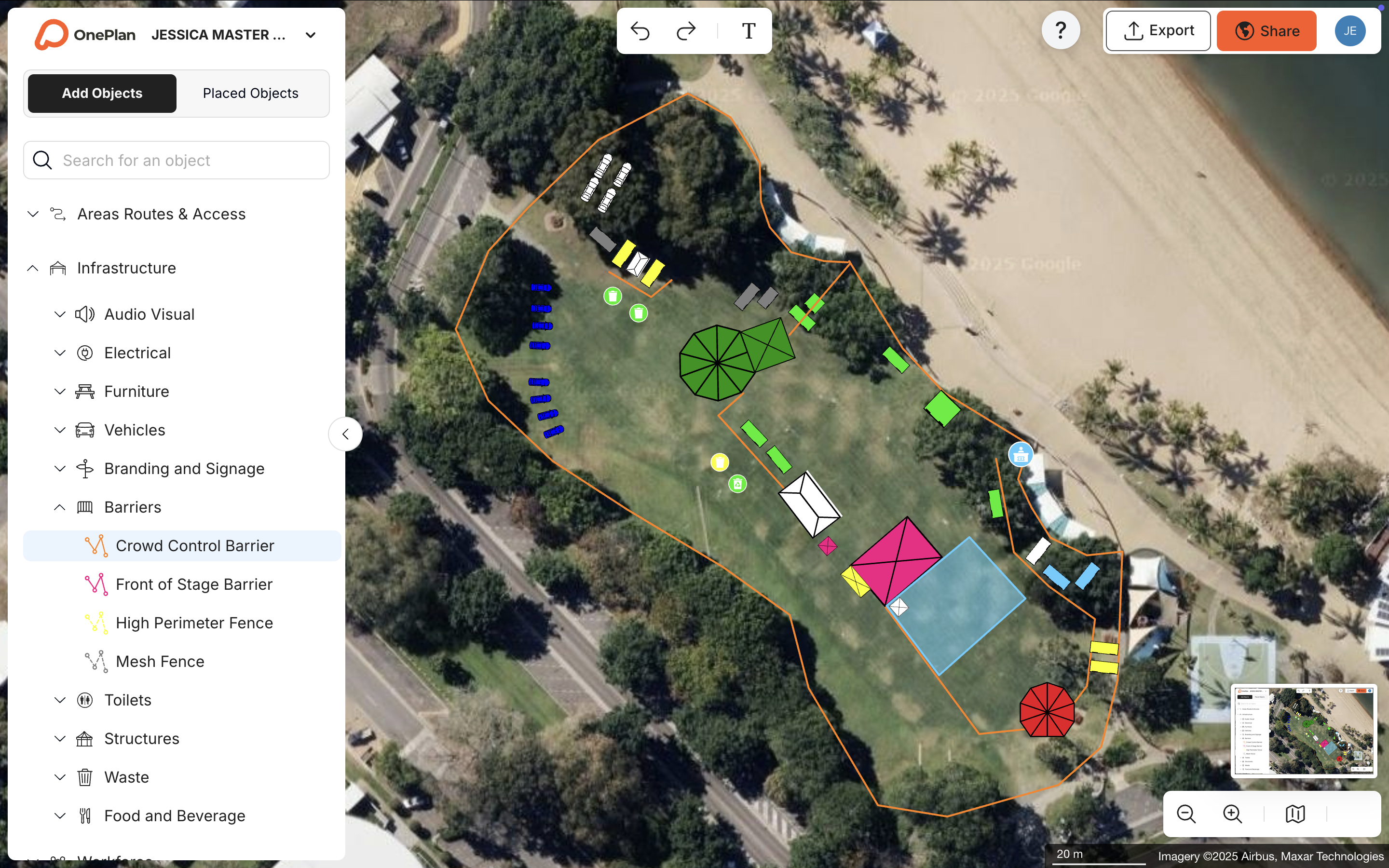
OnePlan is a purpose-built platform that closes this gap. It is a browser-based, drag-and-drop site-planning tool where every object, including tents, stages, crowd barriers, portable toilets, food trucks, signage, vehicles, and staff, sits on a live satellite or street map and remains accurately scaled as you zoom. No engineering degree is required. No blank PowerPoint canvas appears. Teams share an accurate, collaborative, living plan that every stakeholder can work from together.
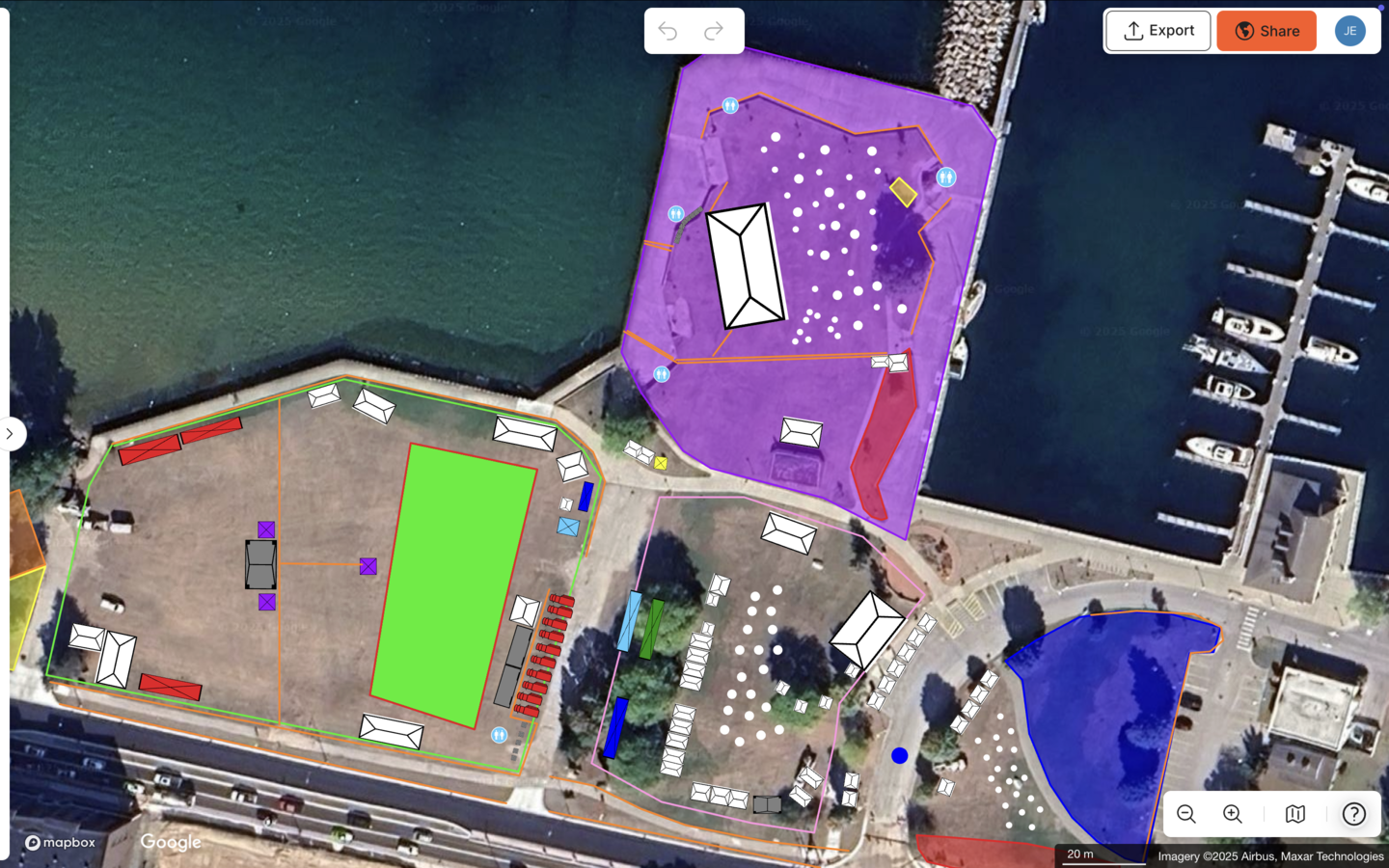
The platform runs on leading GIS mapping technology powered by Esri, which underpins its pinpoint geo-accuracy. Intelligent calculators instantly return area sizes, standing crowd capacities, and ingress and egress flow estimates. An auto-generated Bill of Quantities turns everything on the map into an exportable inventory. Draw a line of crowd barriers and OnePlan tells you exactly how many segments to order. Plans export to high-resolution PNG for permits, contractors, and event-day printouts.
OnePlan has supported events in 150 countries, from community fairs and county festivals to Formula 1 circuits and the Paris 2024 Olympic and Paralympic Games.
What Real Planners Say About OnePlan
-
Silverstone achieves an estimated 13x ROI, a 10% reduction in planning days, and a further 5% supplier efficiency using OnePlan as its single source of truth for the Formula 1 British Grand Prix and 50+ events a year. “For us, OnePlan is that single source of truth, it’s always up-to-date and allows for instant collaboration, especially in our case with suppliers.” — Jacalyn Morgan, Senior Event Manager, Silverstone.
-
Eagle Mountain City cut planning time by 70% from 8–10 hours down to a few hours per event and achieved a 5x ROI by replacing separate maps for fire, police, and facilities with one comprehensive OnePlan layout. “Gone are the days of creating separate layouts for fire, police, facilities, and other departments. Now I can create a single, all-encompassing layout.” — Dawn Hancock, Events Manager, Eagle Mountain City.
-
The Beirut Marathon reduced required site visits from 20 down to just one or two by planning and measuring remotely in OnePlan before committing boots on the ground. “OnePlan makes it easier, basically. I can choose a location for a race that’s not even nearby and start planning everything, measuring everything in OnePlan and see if the layout I want is feasible or not before even doing a site visit.” — Ehrabi Nael, Race Director, Beirut Marathon.
-
Columbus Crew achieved a 40% reduction in planning time after replacing static maps and scattered data with OnePlan. “We were looking to overcome old maps, a lack of collaboration, and the struggle of having data in too many places. With OnePlan, we’ve brought it all together in one system.” — Michael Beirne, Director of Guest Experience, Columbus Crew.
-
Mosaic’s senior producer summarizes the impact clearly. “OnePlan makes planning easier, quicker, and more accurate. It definitely saves time and is less expensive than contracting a CAD designer.” — Elise Fazzari, Senior Producer, Mosaic.
Buyer Decision Matrix: Match Platforms to Your Situation
Use this matrix to align your event type, size, and budget with the platform that best fits your requirements.
|
Your Situation |
Event Size |
Budget |
Best Fit |
|---|---|---|---|
|
Large corporate program, multi-session, compliance-driven |
500–10,000+ attendees |
Enterprise |
Cvent |
|
Public ticketing, general admission, fast setup |
Any |
Low / pay-per-ticket |
Eventbrite |
|
Conference sessions, speaker management, attendee networking |
200–5,000 attendees |
Mid to enterprise |
Whova |
|
Hospitality venue, high-volume bookings, guest management |
Small to mid |
Mid |
Tripleseat / RSVPify |
|
Online or hybrid event delivery, virtual networking |
Any |
Mid to enterprise |
vFairs / Webex Events |
|
Accurate site layout, crowd safety, multi-stakeholder coordination, any physical event |
Any, from community fair to stadium |
Low-cost entry point with a free first event |
OnePlan |
Events with a physical footprint, such as outdoor festivals, road races, stadium game days, community parades, and multi-vendor markets, need accurate layouts and clear safety documentation. When every stakeholder must work from the same plan, OnePlan is the only platform in this guide built specifically for that job.
Frequently Asked Questions
Is there a free event planning platform for site and venue planning?
Yes. OnePlan is free for your first event, with no payment details required and up to 25 objects on the map. That capacity is enough to plan a community fair, a small market, or a single-venue event from start to finish. After your first event, paid plans start from around $75 per month, with a month-to-month option so one-off organizers can pay only for the period they need.
Which platform is the best fit for a small business or first-time event organizer?
For ticketing and guest management, RSVPify or Eventbrite provide accessible starting points. For physical site planning, where you need to know if your tent fits the space, how many portable toilets to order, or how crowd flow will work, OnePlan is the easiest option available. It is drag-and-drop, runs in any browser with nothing to download, and you can start placing objects on a live map within seconds of signing up. The free OnePlan Academy course helps new planners get up to speed quickly, and no engineering background is required.
Can I plan both indoor and outdoor events in OnePlan?
Yes. OnePlan handles outdoor sites and indoor spaces, including multi-level venues where you toggle between floors. You can import existing floor plans or site plans, convert them to .png first, scale them onto the map, and plan on top of them. OnePlan focuses on operational and spatial planning, such as where infrastructure, staff, and crowds go. It is not a 3D interior visualizer or banquet-décor tool.
How do I evaluate whether a site-planning tool is actually accurate?
The key test is whether the platform uses a live, geo-referenced map as its base layer rather than a static screenshot or a blank canvas. In OnePlan, every object placed on the map stays accurately scaled at any zoom level because the canvas uses leading GIS mapping technology. You can outline any area and instantly see its size in square feet, place a tent at its exact dimensions, and calculate standing crowd capacity for any zone. If a tool cannot tell you the real-world area of a space or show you whether a 40-foot tent actually fits, it is not accurate enough for professional site planning.
How does OnePlan help with permits and safety documentation?
OnePlan exports professional, high-resolution maps up to A0, print-ready, and Bill of Quantities reports that list every object on the plan as a structured inventory. Teams use these outputs directly in permit applications, contractor briefings, and safety review meetings. Accurate, scaled layouts and documented crowd-capacity figures support smoother approvals. Permitting requirements and safety standards vary by state and jurisdiction, so always confirm applicable rules with your local authority, fire marshal, or relevant regulatory body.
Conclusion: Choosing the Right Platform Mix
Each category in this guide offers strong options. Cvent supports enterprise conference logistics. Eventbrite makes public ticketing fast. Whova handles conference engagement. Tripleseat and RSVPify serve hospitality and guest management. vFairs and Webex Events deliver hybrid and virtual experiences.
None of these platforms help you plan the physical space your event occupies. The global event management software market is projected to grow substantially over the next decade, yet the site and venue planning category still lacks tools that balance accuracy with ease of use.
OnePlan brings that balance together. It provides a scaled, map-based canvas, drag-and-drop simplicity, real-time collaboration on a single source of truth, and an auto-generated Bill of Quantities. The free first event mentioned earlier and low ongoing pricing create an accessible entry point. The platform is built by and for the events industry, from a community fair to the Olympics.
Start planning your first event free in OnePlan or book a 15-minute demo to see it in action.