
Written by: Paul Foster, Founder, CEO, OnePlan | Last updated: July 20, 2026
Key Takeaways for Festival Site Planning in 2026
- Festival site planning now requires to-scale accuracy, real-time collaboration, and defensible crowd-capacity data as the global market expands.
- Manual tools and engineering software each fall short on the six key criteria: site mapping, coordination, capacity tools, integrations, pricing, and proven results.
- OnePlan consistently scores highest by combining Esri GIS mapping, drag-and-drop simplicity, auto-generated Bills of Quantities, and real-time stakeholder access.
- Case studies show time savings of 70–85 percent and ROI from 3x to 13x across festivals from 1,000 to 600,000 attendees.
- Book a free 15-minute demo with OnePlan to see how the platform can transform your next festival site plan.
Executive Summary: Six Criteria for Festival Planning Software
Six criteria separate adequate tools from the right ones for festival site planning.
- Site mapping accuracy. The tool must produce to-scale layouts on a real-world map base, not guesswork on a blank canvas.
- Vendor and volunteer coordination. All stakeholders need one live plan instead of fragmented emailed PDFs.
- Crowd capacity tools. The platform should calculate standing capacity by zone so organizers do not estimate by eye.
- Integrations. It must connect to mapping technology, file imports, and export formats that teams already use.
- Pricing. The model should work for small crews and community events, not only major productions.
- Real-world results. Documented time savings, ROI figures, and safety outcomes from comparable events should be available.
OnePlan scores across all six criteria. It is a browser-based, drag-and-drop platform built on leading GIS mapping technology powered by Esri. The platform includes an auto-generated Bill of Quantities, real-time collaboration, and a free first event (up to 25 objects, no payment details required). The case studies below document results from festivals ranging from 1,000 to 600,000 attendees.
The Current State of Festival Site Planning Complexity
Festival teams now balance rising safety expectations with shrinking resources. According to OnePlan's 2026 Event Site Planning Report, 71% of event professionals rank attendee safety and security as their top site-planning priority, and over 1 in 3 name crowd safety and flow as their single biggest challenge. At the same time, 44% say accurate measurements and layouts are critical to success, a standard that manual tools routinely fail to meet.
Eighty-nine percent of event professionals report that staffing shortages directly impacted their events in 2025. Smaller teams now manage more complex sites while labor, security, crowd management, and production crew costs consume a large share of festival budgets. Rework from inaccurate plans quickly erodes already tight margins.
This environment produces version-control chaos, inaccurate measurements, and fragmented stakeholder communication. One in 3 event professionals in OnePlan's 2026 report identified stakeholder communication as the most stressful part of the job. These challenges stem directly from the tools teams use, which sets up the current market landscape.
Industry Landscape: How Current Tool Categories Handle Festival Needs
The festival planning software market divides into three categories, each with a distinct profile on festival-specific needs.
Manual, non-specialist tools. PowerPoint, Excel, Canva, Photoshop, Google Maps, and internal static, top-view screenshots and plan files remain common. These tools feel familiar and low-cost, but nothing in them is to scale. Plans fragment into emailed versions, different departments maintain separate maps, and inaccurate layouts become real problems on event day. A tent does not fit, a vendor sits in the wrong spot, or a crowd bottleneck appears that nobody modeled.
Complex engineering software. CAD, AutoCAD, Bluebeam, and Revit deliver precision but were built for engineers. Senior Producer Elise Fazzari at Mosaic notes that OnePlan makes planning easier, quicker, and more accurate, and that it saves time and costs compared with contracting a CAD designer. The Tour of Britain previously relied on local authorities submitting DWG files that took weeks to process. Switching to OnePlan delivered a 75% reduction in site visits, saved more than 300 hours per year, and achieved a 3x ROI.
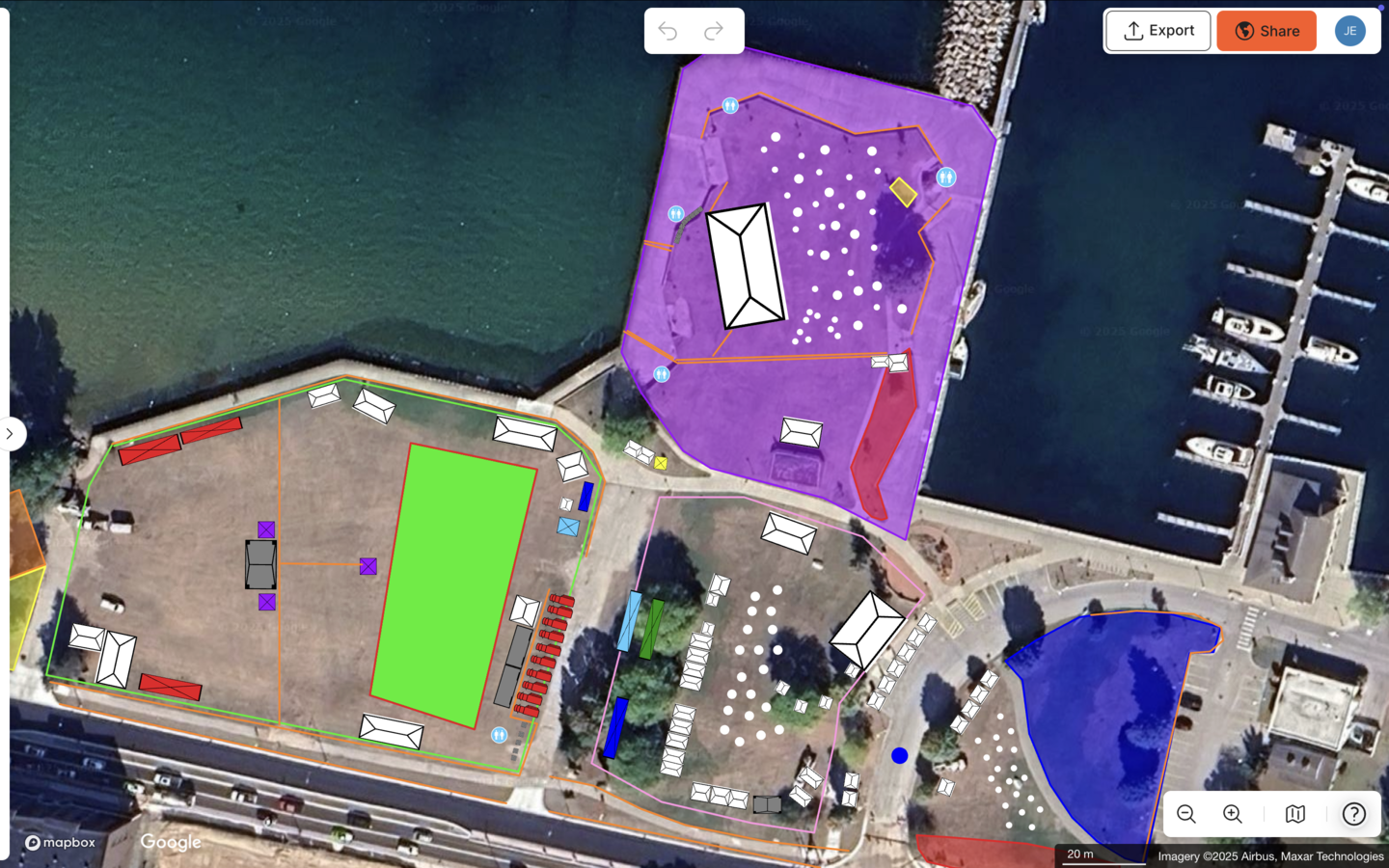
Specialized event site planning platforms. These tools bridge the gap. They provide to-scale accuracy on a live map, drag-and-drop simplicity, real-time collaboration, and event-specific tools such as crowd capacity calculators and auto-generated Bills of Quantities. Teams gain engineering-grade outputs without needing an engineering background.
Strategic Trade-offs When Choosing Festival Planning Tools
Every festival team faces three recurring trade-offs when choosing a planning tool.
Speed vs. accuracy. Manual tools open quickly but take longer to get right because every layout change requires re-measuring and re-sending files. Specialized platforms front-load accuracy so that changes update instantly across a single live plan.
Ease vs. depth. Engineering software offers deep capability but remains inaccessible to most operations teams. The right festival planning tool combines drag-and-drop simplicity with intelligent calculators for crowd capacity, parking, and ingress and egress.
Collaboration vs. cost. Cloud deployment now dominates the event management software market, reflecting a shift toward platforms where teams collaborate in real time instead of exchanging static files. OnePlan's free first event and monthly pricing from around $75 per seat keep this level of collaboration accessible at every festival size.
Decision Framework by Festival Size and Complexity
Festival size shapes which trade-offs matter most, so recommendations follow three common tiers.
Small community events (under 2,500 attendees). Speed and simplicity matter most. Teams need a tool that requires no training, is free to start, and produces a professional, shareable plan for permitting. OnePlan's free tier covers most small-event layouts. Eagle Mountain City reduced planning time by 70%, from 8–10 hours to a few hours per event, and reported a 5x ROI by replacing separate department maps with one shared OnePlan layout.
Mid-size music and food festivals (2,500–20,000 attendees). Vendor coordination, crowd zone planning, and multi-stakeholder sharing become critical. The Bill of Quantities becomes a key control, because knowing exactly how many meters of fencing or how many portable toilets to order prevents costly over- or under-procurement. SoulFest cut planning time by 85%, with almost its entire festival map built within two days. Bearfoot Productions scaled to 10,000-capacity festivals with only two site visits by planning remotely in OnePlan.
Large-scale multi-day events (20,000+ attendees). Accuracy, safety documentation, and multi-agency coordination become non-negotiable. Overestimating usable space is one of the most common and consequential planning errors in the industry, and at this scale the consequences are severe. The National Cherry Festival plans for 600,000 attendees in OnePlan, and Silverstone achieves a 13x ROI while managing approximately 9,000 contractors through the platform.
Best Practices for Accurate Layouts, Infrastructure, and Quantities
Effective festival site planning in 2026 follows a clear sequence that starts with the map, not the spreadsheet.
- Start with a geo-accurate base. Import your site on a live satellite or street map so every object reflects real-world dimensions. If you have an existing floor plan or site plan, convert it to .png and import it as a base layer to plan on top of.
- Define zones before placing objects. Outline crowd areas, stage footprints, vendor zones, parking, and emergency access routes first. OnePlan's area calculator returns the square footage of each zone instantly, which gives you defensible capacity numbers before a single tent goes down. Doing this after object placement often forces time-consuming rework.
- Use the crowd capacity calculator for every standing zone. Draw the crowd area, select a density, and OnePlan shows how many people that space can safely hold. For arrival and exit flow, use OnePlan's free arrival calculator and exit calculator to estimate queue lengths, queue times, and exit capacity.
- Place infrastructure to scale. Every tent, stage, barrier, generator, and portable toilet stays accurately sized as you zoom. The auto-generated Bill of Quantities turns the finished map into an exportable inventory. Draw a line of crowd barriers and OnePlan tells you exactly how many segments to order.
- Share one live plan. Export high-resolution maps for permits and contractor briefings, and share live view-only links so operations, security, medical teams, vendors, and local authorities always see the current version.
Implementation Readiness: What to Prepare Before Onboarding
Teams see the fastest results from festival planning software when they prepare a few foundations in advance, ideally in a simple sequence.
First, define your team structure and identify the “ring leader” who will own the plan and invite collaborators across operations, security, medical, vendors, and local authorities. Once roles are clear, assemble your data sources, including existing site plans, floor plans, CAD-derived files, or drone imagery converted to .png for import.
With people and data ready, map your approval workflows so everyone understands who needs view-only access and who needs editing rights, and agree on a single source of truth before planning begins. Next, align on safety thresholds with relevant authorities, including crowd density limits and emergency access requirements. These rules vary by region, so always consult local fire, police, and licensing authorities.
Finally, confirm export requirements such as file formats and resolution for permits, contractor briefings, and event-day printouts. This preparation keeps your planning workflow smooth from first draft to final sign-off.
Common Pitfalls in Festival Site Planning
The most damaging planning errors usually trace back to tools that were never built for festival site design.
- Version control collapse. When plans live in static files emailed between departments, teams act on outdated maps. A single live plan removes this risk.
- Inaccurate measurements. Layouts built on screenshots or blank canvases produce tents that do not fit and miscalculated crowd zones. Accurate capacity calculations require deducting stages, vendor footprints, infrastructure, barriers, and geometrically inaccessible areas from usable space, a step that manual tools make difficult to perform correctly.
- Fragmented stakeholder plans. Security, traffic, operations, and medical teams each maintaining their own map create dangerous gaps. Dawn Hancock of Eagle Mountain City explains the change: “Gone are the days of creating separate layouts for fire, police, facilities, and other departments. Now I can create a single, all-encompassing layout.”
- Late-stage rework. Discovering that a vendor placement blocks an emergency access route on event day reflects a planning failure, not an operations failure. To-scale planning catches conflicts at the desk, not on site.
Festival Planning Software Comparison Table
The table below compares six tools across three dimensions relevant to festival site planning: site mapping capability, crowd capacity tools, and vendor coordination. Pricing varies significantly by plan, region, and feature set, so specific pricing details appear in the narrative sections for each tool category instead of in this table.
| Tool | Site Mapping Capability | Crowd Capacity Tools | Vendor Coordination |
|---|---|---|---|
| OnePlan | To-scale on live satellite or street map (Esri GIS), thousands of event objects, Bill of Quantities, free first event | Standing crowd capacity calculator by zone, arrival and exit flow calculators | Real-time collaboration, role-based permissions, live view-only share links, Bill of Quantities export |
| PowerPoint / Canva / Google Maps | Not to scale, static screenshots, no event-specific objects | None | File-based collaboration, no real-time updates, frequent version control issues |
| CAD / AutoCAD | Precise and to scale, requires specialist training and significant setup | No native crowd tools, requires specialist configuration | Limited collaboration, plans shared as static DWG or PDF files |
| FestivalPro | General event management focus with limited site mapping capability | Not a primary feature, minimal built-in support | Strong on artist and vendor scheduling, weaker on spatial coordination |
| Sched / Whova | Agenda and attendee management, no to-scale site mapping | None | Attendee-facing app features, not designed for operational site coordination |
| Eventplot | Interactive 3D planning on geographically accurate maps with configurable parametric assets | Zone-based planning and attendee-facing interactive maps | Role-based permissions with vendors managing their own profiles in a shared workspace |
General event management platforms such as Sched and Whova excel at attendee registration, scheduling, and mobile apps, but general event management software treats vendor management as a secondary feature and prioritizes attendee workflows over infrastructure mapping. These tools do not replace to-scale site planning platforms.
OnePlan Festival Case Studies: Real 2026 Results
SoulFest, 85% time saving. One of New England's largest music festivals, with more than 75 artists over three days, cut planning from two weeks at 3–4 hours a day to one hour a day for a week, with almost the entire map built in two days. Associate Producer Renna Muhieddin notes, “I had almost every single element of our map on the OnePlan platform within two days. It was amazing.”
National Cherry Festival, 600,000 attendees. Director of Event Operations Brett Knaus says, “I would recommend OnePlan to any large-scale event companies looking for the best layout software on the market today. 10 out of 10 experience!”
Bearfoot Productions, scaling to 10,000 capacity. For a new 10,000-capacity festival, Director Tom Newton completed the design with only two site visits by using OnePlan instead of weekly visits. He then confidently ordered 8 km of fencing based on accurate map measurements.
North Texas Tribute Jam, 110 hours saved. The festival saved 110 hours of planning time by moving site coordination into OnePlan.
Recommendations by Festival Type
Any festival that cares about site layout accuracy, crowd safety, vendor placement, and multi-stakeholder coordination benefits from a purpose-built planning platform. General event management tools handle ticketing, scheduling, and attendee apps well, but they do not replace to-scale site planning. CAD remains accurate but inaccessible to most festival teams and expensive to maintain. Manual tools lack both accuracy and collaboration.
OnePlan is the only option in this comparison that combines accuracy, ease, and affordability. Teams gain a to-scale map-based plan, drag-and-drop simplicity, real-time collaboration, an auto-generated Bill of Quantities, and a free first event. It has powered 200,000 events in 150 countries, from community fairs to the Paris 2024 Olympic Games.
Best Festival Planning Software for Small Festivals
Small festivals, typically under 2,500 attendees, need software that requires no specialist training, is free or low-cost to start, and produces a professional, shareable site plan for permitting and vendor coordination. OnePlan's free tier covers most small-event layouts, and paid plans start from around $75 per month. Eagle Mountain City's 5x ROI and 70% time saving show what even a small team can achieve with the right tool.
Best Free Festival Planning Software Options
OnePlan offers a genuinely free first event with up to 25 objects placed, and no payment details required. That allowance covers a full site layout for most small and community festivals. For organizers who need more objects or multiple events, monthly plans start from around $75 per seat, with annual billing saving approximately 20%. Month-to-month options keep the platform viable for one-off events without long-term commitment.
Top Site Planning Tools Built into OnePlan
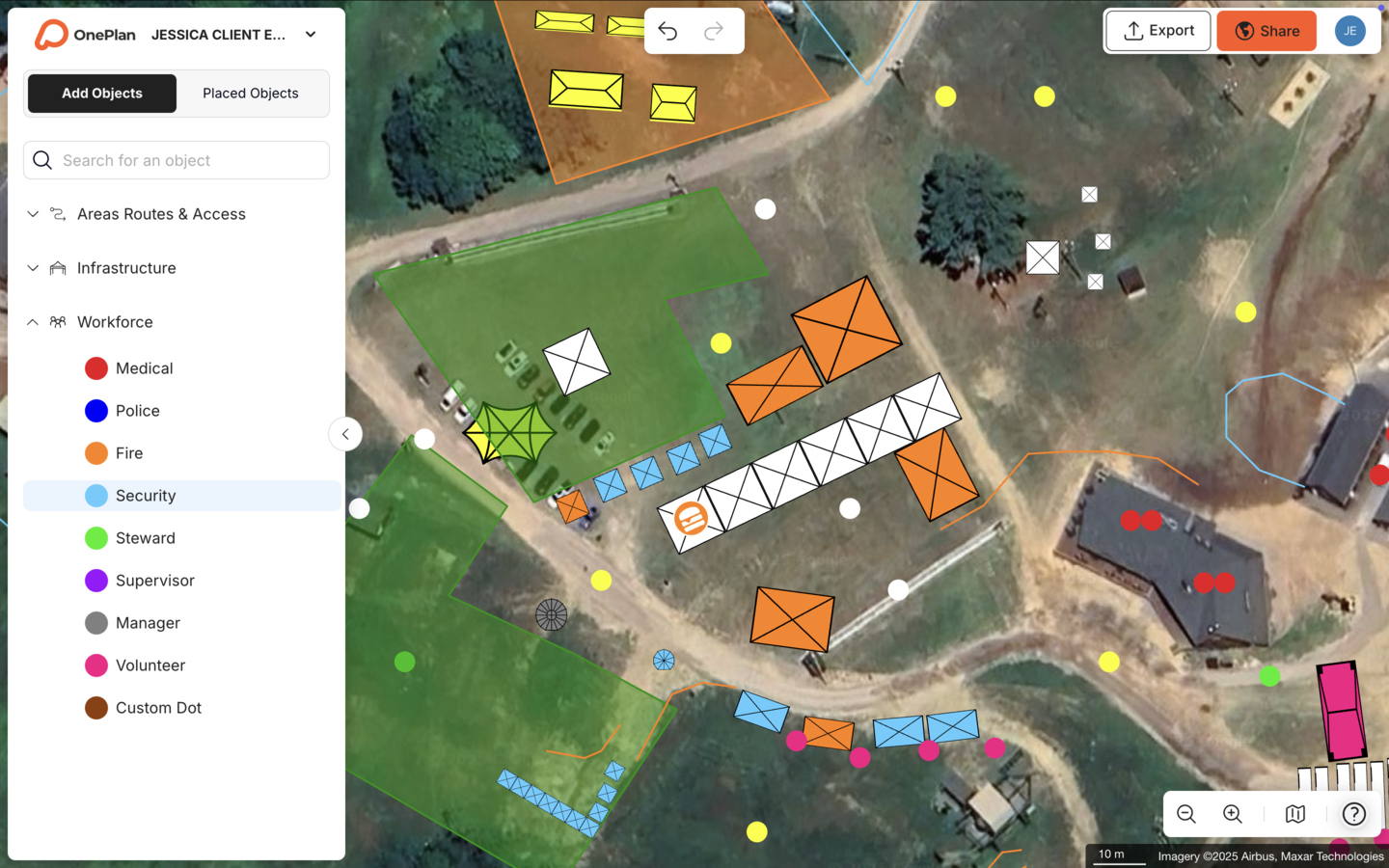
The most valuable tools for festival site planning combine to-scale mapping, crowd capacity calculation, and multi-stakeholder collaboration in one platform. OnePlan's core toolkit for festivals includes:
- Live satellite and street map base powered by Esri GIS
- Thousands of drag-and-drop, to-scale event objects such as tents, stages, crowd barriers, portable toilets, generators, food trucks, and signage
- Area and perimeter calculator for every zone
- Standing crowd capacity calculator
- Arrival and exit flow calculators
- Auto-generated Bill of Quantities exportable to Excel or CSV
- Real-time collaboration with role-based permissions
- High-resolution map export for permits and contractor briefings
- What3Words integration for precise infrastructure placement
Frequently Asked Questions
What is the difference between general event management software and festival site planning software?
General event management software handles attendee registration, ticketing, scheduling, and mobile apps. Festival site planning software handles the physical layout of the event site, including stages, tents, barriers, vendors, and crowd zones, at accurate scale on a real-world map. The two categories solve different problems. OnePlan is purpose-built for site planning and works alongside general event management tools.
When does a festival need structured site planning software?
Any festival that requires a site plan for permitting, involves multiple vendors or stakeholders, or has crowd zones that need capacity calculations benefits from structured site planning software. In practice, that includes almost every festival, because even small community events need a map for fire, police, and vendor coordination. Creating a to-scale plan early in the planning cycle reduces costly changes closer to event day.
Can OnePlan handle multi-stakeholder collaboration for festivals?
OnePlan supports multi-stakeholder collaboration for festivals of all sizes. Multiple team members can edit the same live plan simultaneously, and organizers can share secure, password-protectable view-only links with vendors, local authorities, security teams, and medical staff. Everyone works from one single source of truth instead of chasing the latest emailed version. Role-based permissions, including Owner, Admin, and Member, control who can edit and who can view.
How does OnePlan help with crowd safety at festivals?
OnePlan's crowd capacity calculator lets organizers outline any standing zone and instantly see how many people it can safely hold at a chosen density. The area calculator deducts infrastructure footprints automatically so capacity figures reflect usable space. For arrival and exit planning, OnePlan's free arrival and exit calculators estimate queue lengths, queue times, and exit capacity based on gate width, crowd size, and flow rate. These tools produce defensible, documented figures for safety planning and regulatory submissions, always alongside local authority requirements, which vary by region.
How accurate is OnePlan's site mapping for festivals?
Every object placed in OnePlan sits on a live satellite or street map built on Esri GIS technology. A tent placed at 10 × 20 ft stays accurately sized as you zoom, and outlining a crowd zone returns its exact square footage. The Canadian Football League's Courtney Clace describes the practical result: “I can take real measurements in OnePlan. I'm confident when presenting to senior executives, when they say, can this go here? I can say, yes it can. It'll fit.”
What does OnePlan's Bill of Quantities do for festival procurement?
Everything placed on the map saves automatically to a structured inventory. The Bill of Quantities exports to Excel or CSV as a run sheet, load-in or load-out list, or cost-analysis tool. Draw a line of crowd barriers and OnePlan calculates exactly how many segments to order. Bearfoot Productions used this feature to confidently order 8 km of fencing for a 10,000-capacity festival without a specialist procurement consultant.
Conclusion: Choosing Festival Planning Software in 2026
The six-criteria framework of site mapping accuracy, vendor and volunteer coordination, crowd capacity tools, integrations, pricing, and real-world results points toward one conclusion. The right festival planning software is accurate, easy, and affordable at the same time. Manual tools deliver ease but not accuracy. Engineering software delivers accuracy but not ease. OnePlan delivers all three.
Global festival attendance reached approximately 220 million visitors in 2025, and the operational complexity behind those events continues to grow. Teams that plan safe, well-coordinated festivals in 2026 work from a single, to-scale, live plan instead of a folder of emailed screenshots.
The platform's track record, from the North Texas Tribute Jam to the National Cherry Festival to the Paris 2024 Olympic Games, shows that OnePlan scales across every festival size. The first event is free, and a full site layout takes minutes to start.