
Written by: Paul Foster, Founder, CEO, OnePlan
Key Takeaways for Market Managers
-
Public market management now requires more than spreadsheets as vendor volumes, permits, and safety requirements increase. Most vendor tools handle applications, payments, and reporting but leave physical booth placement unresolved, which creates compliance risks.
-
Accurate to-scale site planning is essential for meeting fire marshal, parks department, and permitting authority standards on event day.
-
OnePlan connects with existing vendor software to turn vendor lists into compliant, print-ready site layouts with infrastructure and emergency access mapped. See how OnePlan moves you from vendor data to permit-ready maps in a short live walkthrough.
Site Layout & Safety: Closing the Compliance Gap
This compliance gap is not theoretical. Market managers face it every event day. The Cheese & Chilli Festival manages over 120 food vendors, licensed bars, fairground activities, and live entertainment stages across four events a year. Before switching to OnePlan, their organizer described the problem directly: “With the software we were using before, the ability to scale wasn’t great. We couldn’t rely on it to be accurate and we would often get to site and have to make changes to layout due to plans not being to scale.”
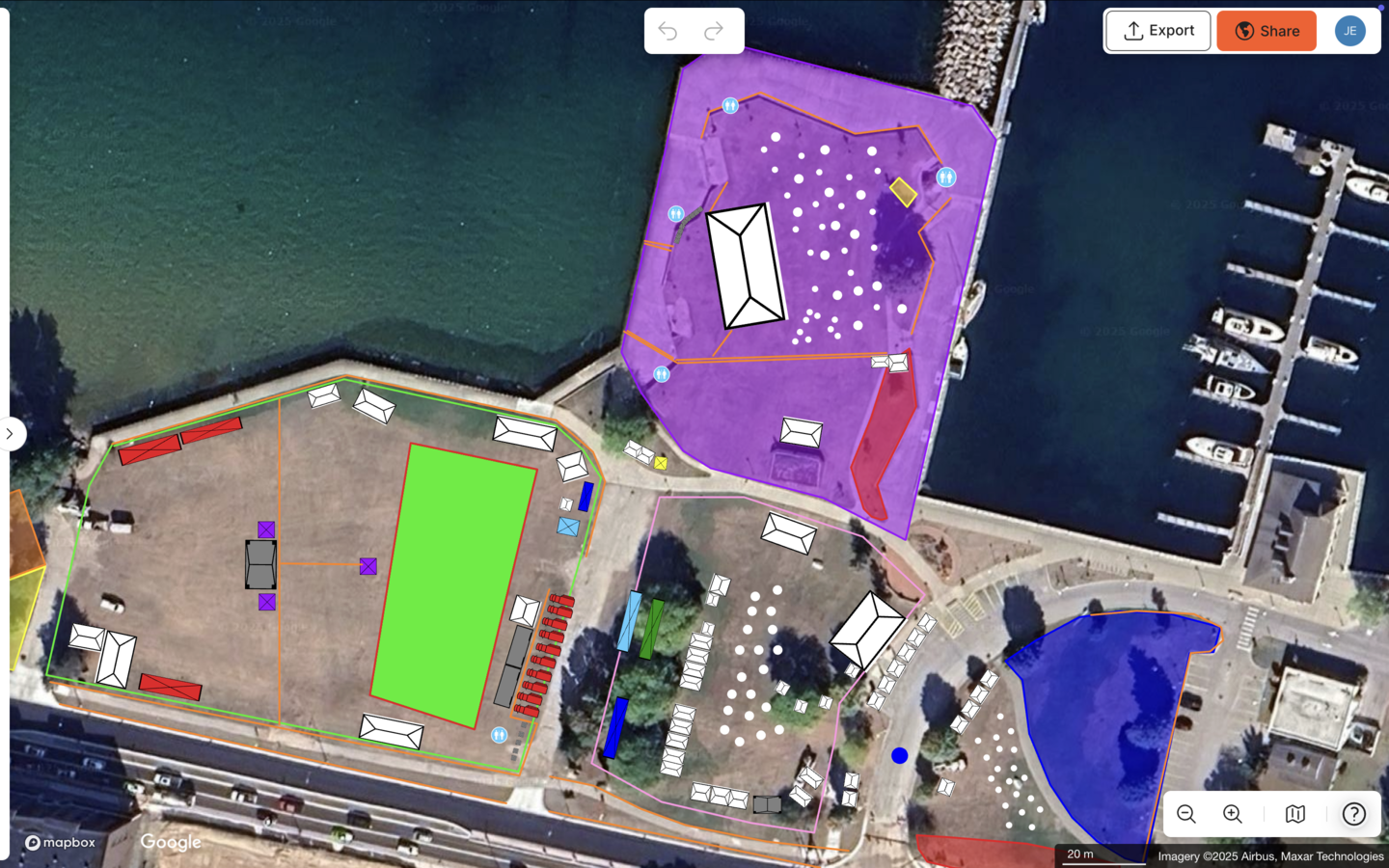
That experience is typical. Vendor management software tells you who is coming and what they have paid. It does not tell you whether their booth physically fits in the assigned space, whether your emergency access lane is wide enough, or whether your layout will pass a fire marshal review. Requirements vary by jurisdiction, so always confirm with your local authority. Those answers require a to-scale site map, and most vendor tools do not provide that map.
OnePlan is a browser-based, drag-and-drop site planning platform built specifically for this problem. Its base layer is a live satellite or street map, not a screenshot, so every object placed on it, from a 10×10 ft vendor tent to a run of crowd barriers, stays accurately to scale as you zoom. Market managers can place booths to their exact dimensions, mark access routes and emergency egress, calculate the standing capacity of crowd areas, and export a print-ready, high-resolution map for their permitting authority. They can do this without any engineering background or specialist software.
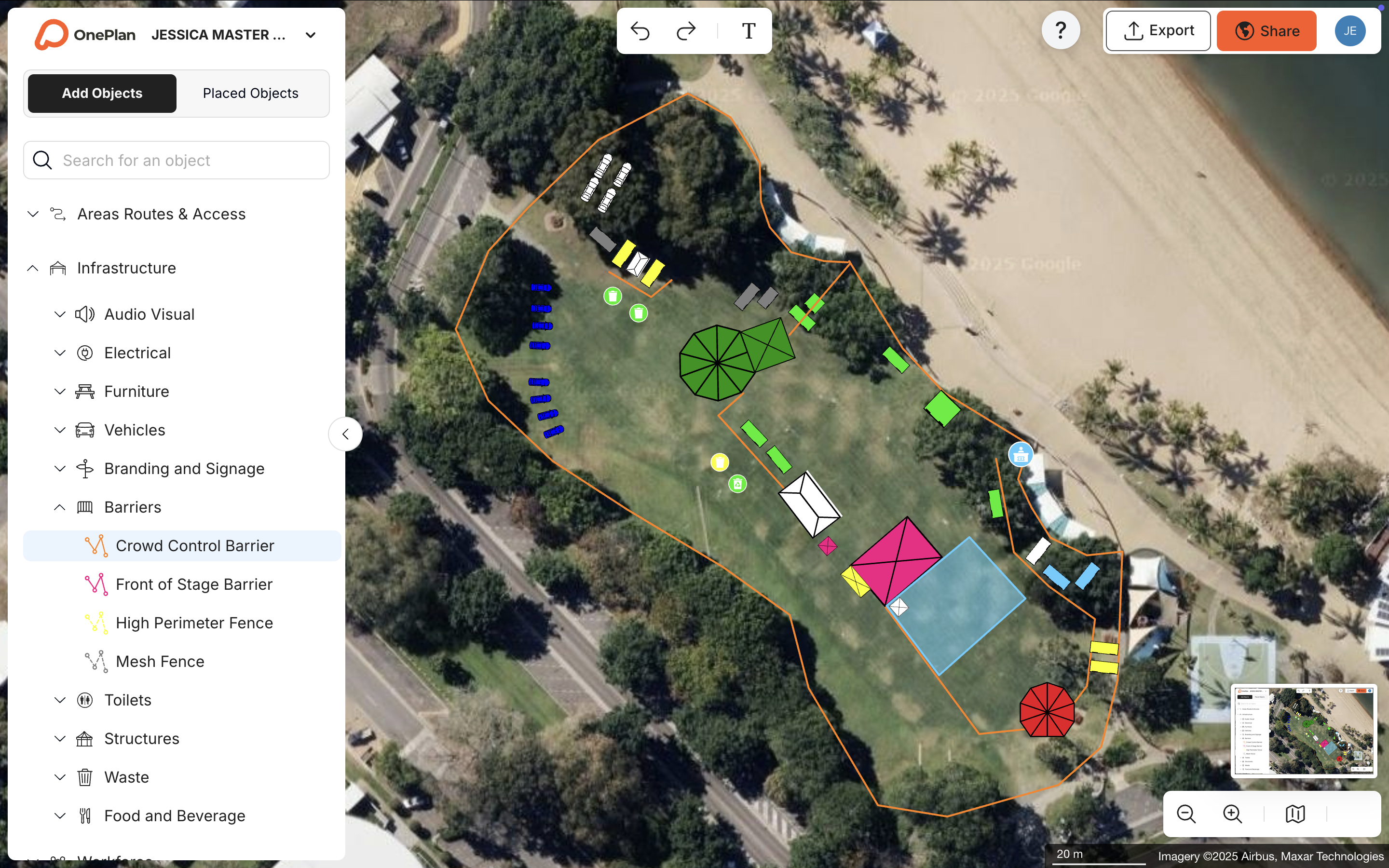
As the organizer put it: “OnePlan gives us reliable safety and planning information that supports our planning, operations and stakeholders.”
Integrating Vendor Software with To-Scale Site Planning
Most market managers follow a simple workflow. They use a vendor management tool to handle applications, assignments, and payments, then bring that vendor list into OnePlan to build the physical layout.
Here is how that looks in practice:
-
Import your vendor list. Bring your confirmed vendor roster into OnePlan and start placing booths on a live satellite map of your market site, sized to the exact dimensions each vendor has been assigned.
-
Place booths to scale. Place booths using OnePlan’s library of tents, market stalls, food trucks, fencing, crowd barriers, portable restrooms, generators, and signage, all sized accurately in imperial measurements. Because every object is drawn to its real-world dimensions, a 10×10 ft booth placed on the map occupies exactly 10×10 ft, which keeps your layout aligned with reality on event day.
-
Auto-generate your Bill of Quantities. Create your Bill of Quantities from the objects you have placed. Every item on the map saves automatically to a back-end inventory, so OnePlan can calculate exactly how many feet of fencing you need, how many portable restrooms to order, and how many crowd barriers to place. You can then export that list to Excel or CSV for your suppliers.
-
Export permit-ready maps. Export high-resolution maps, up to A0 and print-ready, once your layout is finalized. OnePlan generates maps for your parks department, fire marshal, or local permitting office, with every element to scale, documented, and defensible.
TRC Events used OnePlan to manage over 170 tents and exhibitors at their Christmas in July arts and craft show, placing each vendor precisely down to the inch. Their organizer noted: “My vendors very much appreciate how I’m able to involve them in the process. OnePlan makes managing vendors so much easier, having it all in one system.”
Eagle Mountain City, Utah, cut event planning time from 8–10 hours down to a few hours by replacing separate Google Maps screenshots and Publisher layouts with a single OnePlan map shared across all departments, including fire, police, facilities, and vendors, achieving a reported 5x ROI in the process.
OnePlan is free for your first event, up to 25 objects, with no payment details required. Explore OnePlan in a short live session tailored to your market layout.
Common Questions About Market Layout and OnePlan
Using Separate Tools for Vendor Management and Site Planning
Most market managers benefit from using both types of tools. Vendor management platforms handle the data layer, including applications, waitlists, payments, and reporting, efficiently. OnePlan handles the physical layer, which covers where each vendor goes on the ground, to scale, with all supporting infrastructure mapped and documented. The two tools complement each other rather than compete.
Risks of Using a Non-Scaled Layout for Booth Placement
The risk appears on event day. A booth assigned on paper may not physically fit in the space once you account for neighboring vendors, access lanes, fencing, and utility connections. If your layout has not been drawn to scale, you discover these conflicts on setup day, when there is no time to fix them cleanly. In some jurisdictions, an inaccurate site plan can also delay or block permit approval. Requirements vary, so confirm details with your local authority.
Support for Both Small Seasonal and Larger Year-Round Markets
OnePlan supports both small seasonal markets and larger year-round operations. The platform is used for everything from a 30-vendor community fair up to events with hundreds of thousands of attendees. For seasonal markets, you can reuse your site plan year over year, updating vendor placements as your roster changes. For year-round operations, the plan functions as a living document that stays current as your market evolves. Your first event is free, and paid plans scale with your needs.
Permit Documentation for Public Markets
OnePlan exports high-resolution, print-ready maps, up to A0 size, that show your market layout to scale with all infrastructure labeled. You can also export a Bill of Quantities listing every item placed on the map. These outputs give your parks department, fire marshal, or local permitting office a clear, accurate picture of your event, which makes the approval process faster and better documented. Always confirm specific permit requirements with your local authority, as they vary by city and state.
Learning Curve for New OnePlan Users
OnePlan uses a drag-and-drop interface, and you can sign up and start placing objects on a live map in seconds. No engineering background or design degree is required. A free OnePlan Academy course walks new users through the platform and issues a verified completion certificate.
Conclusion & Practical Next Steps
Vendor management software solves the data side of running a public market, including applications, booth assignments, payments, and reporting, and the tools in this guide handle that work well. The gap they all share is the physical side, an accurate, to-scale site map that shows exactly where every booth sits on the ground, with fencing, access routes, emergency egress, and infrastructure all documented and ready for permits.
OnePlan fills that gap. It is a purpose-built, map-based platform that turns your vendor list into a compliant, to-scale site layout without requiring specialist software or technical training. Market managers from community fairs to large recurring festivals use it to cut planning time, reduce on-site surprises, and produce the documentation their permitting authorities actually need.
Your first event is free. Start planning your market layout now, with your first event on us and no payment details required.