
Written by: Paul Foster, Founder, CEO, OnePlan
Key Takeaways for Stadium Operations Teams
- Stadium operations planning software is now essential in 2026 as venues operate as year-round entertainment districts that need real-time, map-based coordination across many stakeholders.
- Traditional tools like spreadsheets, static PDFs, and CAD systems fall short for high-volume stadiums, creating version chaos, wasted planning time, and compliance risk that modern collaborative platforms remove.
- To-scale drag-and-drop planning, standing crowd-capacity calculators, multi-level floor-plan imports, and real-time role-based collaboration now sit at the core of effective stadium operations.
- Documented results from leading venues show clear gains: Silverstone achieved 13x ROI and Columbus Crew reduced planning time by 40% after adopting integrated planning platforms.
- OnePlan brings these capabilities into one browser-based platform, and you can book a demo today to see how it can change your stadium operations.
How Leading Platforms Compare for Stadium Use
The table below rates six platform categories against criteria that matter most to stadium operations directors, venue managers, and heads of security. Each rating reflects documented capabilities or publicly stated limitations.
| Criteria | Spreadsheets / Static PDFs | CAD / AutoCAD | Generic Venue ERP / Booking Systems | Iventis | OnePlan |
|---|---|---|---|---|---|
| Visual, to-scale planning on a live map | No | Yes (engineer-operated) | No | Yes | Yes, drag-and-drop, browser-based |
| Standing crowd-capacity calculator | No | No | No | Partial | Yes, instant, selectable density |
| Multi-level / floor-plan (.png) import | No | Yes (specialist required) | Limited | Yes | Yes, import any .png, plan on top |
| Real-time multi-stakeholder collaboration | No | Limited | Limited | Yes | Yes, live, role-based permissions |
| Pricing accessibility | Free but limited | Expensive + training costs | Mid–high; module-based | Enterprise pricing | Free first event; from ~$75/mo |
| Proven venue results | None documented | None documented | None documented | Major events | 13x ROI (Silverstone); 40% time saving (Columbus Crew) |
The capabilities in that comparison shape how stadiums handle their most frequent operational challenges. Booking management is a clear example.
Booking Management for High-Volume Stadium Calendars
Busy stadiums running 30–200+ events per year need booking management that connects dates to space, not just to a calendar. Teams must see which zones are active, where vendor footprints land, and how one event setup overlaps with the next load-in. Generic booking systems track dates and rooms but cannot show a to-scale map of how a sold-out concert reconfigures the same floor plan used for a corporate dinner the night before.
Columbus Crew uses OnePlan across Lower.com Field and Historic Crew Stadium to plan sports, concerts, community events, and corporate functions on one live platform. The club replaced static maps and scattered data that previously made cross-event coordination a manual headache.
Facility Maintenance Linked to Event Layouts
Facility maintenance in a multi-purpose venue depends on accurate event layouts. Teams need to know where temporary infrastructure sits, how it interacts with permanent fixtures, and what must be cleared between events. When that plan exists only as a PDF in a shared drive, maintenance staff often work from outdated information.
Silverstone previously relied on AutoCAD, where the plan was only as current as the last exported PDF, a problem that compounded across 50+ events a year and thousands of contractors. Moving to a live, collaborative platform removed that lag and kept everyone aligned on the latest layout.
Staffing & Workforce Planning on a Live Map
Stadium staffing requires precise placement of security, medical, stewards, supervisors, and volunteers across a complex site. Every department needs to see the same picture to avoid gaps and overlaps. OnePlan's workforce planning tools let teams place staff as dots on the map, assign roles, shift times, and notes, and draw patrol routes directly on the live plan.
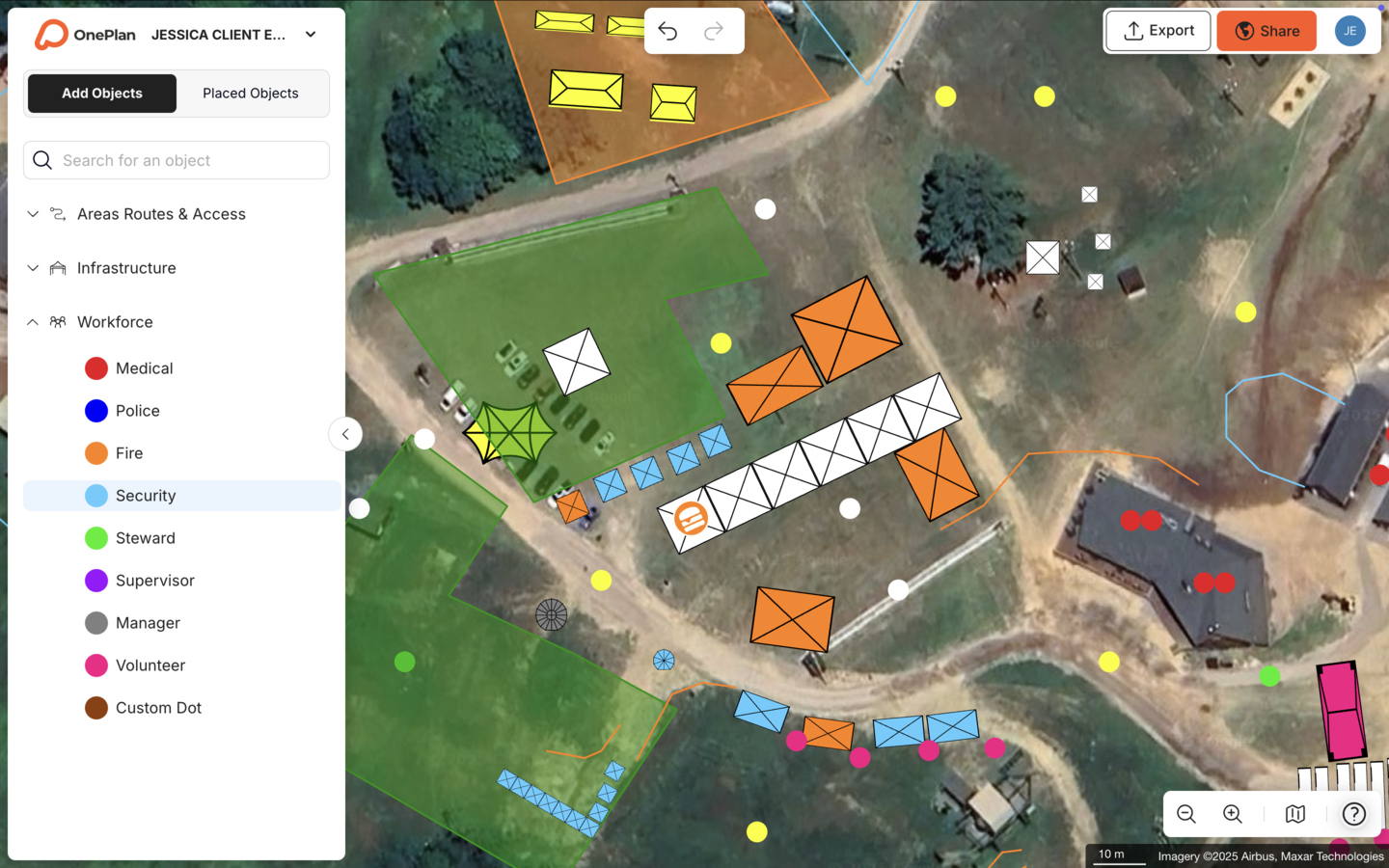
That staffing data exports to a structured dashboard instead of living in a disconnected spreadsheet. Stadium, a UK security and traffic management firm, coordinated a 12-hour event with roughly 400 road closures across 7 procession routes and 110 stakeholders in OnePlan.
Crowd Logistics & Safety for Large Audiences
Crowd logistics is where fragmented tools create the highest risk. According to OnePlan's 2026 Event Site Planning Report, over 1 in 3 event professionals name crowd safety and flow as their single biggest planning challenge, and 71% rank attendee safety as their top priority. Estimating crowd density by eye, or from a non-scaled PDF, does not provide a defensible approach when a venue holds tens of thousands of people.
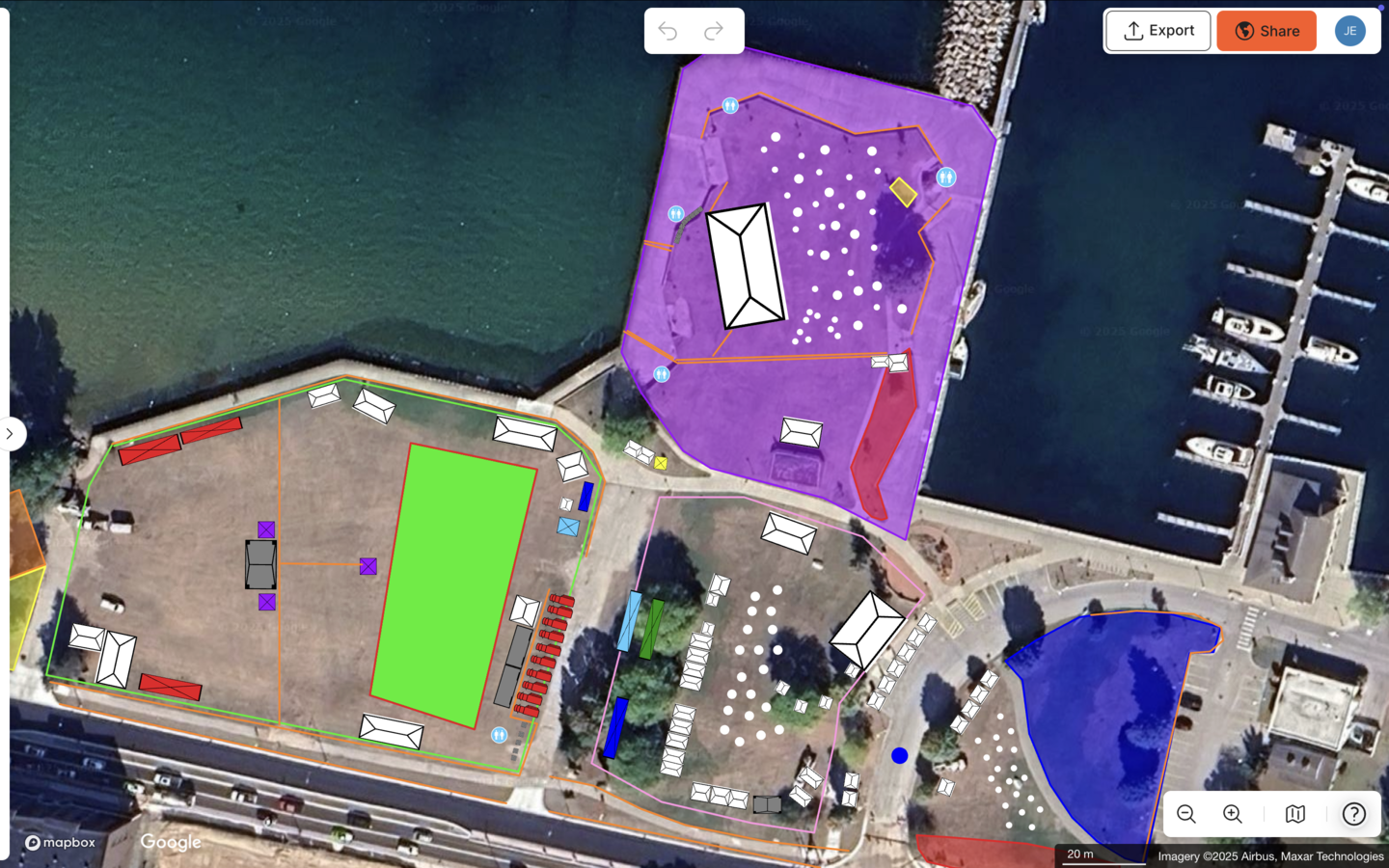
OnePlan's standing crowd-capacity calculator lets teams outline any area, select a people-per-square-foot density, and instantly see safe capacity figures before event day. Traffic and ingress and egress calculators support pedestrian flow, parking allocation, and vehicle access points. The Jockey Club treats its OnePlan map as "the gospel of truth" for events drawing over 100,000 attendees at Epsom Downs, a standard that static PDFs cannot meet.
Real-Time Operations on Event Day
Event-day operations move quickly as vendors shift, gates close, and medical posts relocate. When the plan lives in a static file, those changes either never reach key people or create a new version that half the team never receives. Real-time collaboration keeps every stakeholder, including operations, security, medical, broadcast, and external partners, on the same live plan the moment it updates.
Columbus Crew's Director of Guest Experience, Michael Beirne, put it directly: "We can plan faster, collaborate better, and make decisions in the same meeting. It's just much more efficient." That kind of real-time decision-making depends on everyone working from one source of truth.
A Simple Decision Framework for Choosing Stadium Operations Software
Four connected factors determine which platform fits your venue.
- Event volume sets your baseline. Running fewer than 10 events a year often suits a free or low-cost entry tier. Running 30–200+ events requires a platform built for high-volume, repeatable planning with reusable templates and a live base map, which then shapes what you need from the other three factors.
- Capacity thresholds raise the stakes. Venues above 10,000 standing capacity need defensible crowd-density calculations, not estimates. Confirm any platform you evaluate includes a standing crowd-capacity calculator and can document outputs for safety review. Requirements vary by jurisdiction, so always verify with your local authority.
- Stakeholder mix defines collaboration needs. High volume plus high capacity usually means multiple departments. If operations, security, medical, police, and external contractors all need to work from the same plan, real-time collaboration with role-based permissions becomes essential. Platforms that export static PDFs for each department create version chaos.
- Integration needs prevent starting from zero. Venues with existing floor plans or CAD-derived drawings should prioritize platforms that import .png files and allow planning directly on top. That approach means your high-volume, high-capacity, multi-stakeholder planning does not require recreating your entire venue first.
Book a 15-minute demo to see OnePlan in action and apply this framework to your venue.
Why OnePlan Leads for Stadiums and Arenas
OnePlan is a browser-based, visual, to-scale map platform built specifically for event site and venue planning. For stadium operations teams, it delivers five capabilities that no other tool combines at this price point.
- Drag-and-drop, to-scale objects. Every item, including crowd barriers, fencing, tents, generators, signage, and vehicles, stays accurately to scale as you zoom. Place a 10×10 ft tent and it reflects exactly how it fits on the ground.
- Standing crowd-capacity calculator. Teams can outline any area, select a people-per-square-foot density, and get an instant, defensible capacity figure.
- Traffic and workforce tools. Ingress and egress calculators, parking allocation, road closures, and staff placement with shift assignments all sit on the same map, not in a separate spreadsheet.
- Auto-generated Bill of Quantities. Everything placed on the map exports as a structured inventory. Draw a run of crowd barriers and OnePlan reports exactly how many segments to order.
- .png and CAD-derived file import with multi-level support. Convert existing floor plans to .png, import them, scale them onto the map, and plan on top. Toggle between levels for indoor and outdoor multi-floor venues.
The results are documented. Silverstone achieved a 13x ROI, a 10% reduction in planning days, and a further 5% in supplier efficiencies across 218 events and around 9,000 contractors. Columbus Crew delivered the planning efficiency gains mentioned earlier, bringing operations, security, police, and medical teams onto one live plan for every event type at both of its stadiums. The Canadian Football League replaced Microsoft Publisher, Excel, and CAD drawings with OnePlan's layered, collaborative maps, giving security teams route and exit views without exposing vendor-placement details to every stakeholder.
OnePlan has powered 200,000 events in 150 countries, from community fairs to the Paris 2024 Olympic Games. It won the Sports Business Journal's Best Venue Operations Technology award in 2024 and the KPMG Tech Innovator of the Year award in 2025. Your first event is free, with up to 25 objects and no payment details required.
Frequently Asked Questions
Does OnePlan work for both indoor and outdoor stadium environments?
Yes. OnePlan supports outdoor site planning on satellite and street maps and indoor planning using imported floor plans scaled onto the map. Multi-level venues can toggle between floors, which suits stadiums and arenas that operate across concourses, field level, and surrounding districts. The platform focuses on operational and spatial planning, such as where infrastructure, staff, and crowds go, rather than 3D interior visualization or décor rendering.
How does OnePlan handle crowd-capacity calculations for large venues?
OnePlan's standing crowd-capacity calculator lets you outline any area on the map, select a people-per-square-foot density, and instantly see how many people that space can safely hold. This applies to standing areas only. For seated configurations, refer to your venue's licensed capacity documentation and the requirements of your local authority, as regulations vary by jurisdiction. OnePlan's outputs give you a documented, defensible basis for planning conversations with operations and safety partners.
Can we import our existing floor plans and CAD drawings?
Yes. Convert your existing PDFs, CAD-derived files, drone shots, or site plans to .png format first, then import them into OnePlan, scale them onto the map, and plan directly on top. Floor plans that previously sat unused in a shared drive become reusable base maps you can build on for every event. You do not need to recreate your venue from scratch.
Is OnePlan suitable for venues running a high volume of events year-round?
Yes. Silverstone plans the Formula 1 British Grand Prix and 50+ events a year in OnePlan, coordinating the contractor volume mentioned earlier through the platform. Columbus Crew uses it across two stadiums for sports, concerts, corporate, and community events. Reusable templates, a live base map, and real-time collaboration mean each new event starts from a strong foundation rather than a blank page.
What does OnePlan cost, and how quickly can a team get started?
Your first event is free, with up to 25 objects and no payment details required. You can sign up and start placing objects on your venue map in seconds. Paid plans start from around $75 per month per seat, with an annual option that saves approximately 20%. Pro plans support individual planners managing up to 10 events. Team plans start at 3 users and include unlimited event creation and collaboration features. No engineering background or specialist training is required, because OnePlan is drag-and-drop and built for operations people, not technical drafters.
Next Steps: Move Your Stadium Planning to One Live Map
The decision framework is clear. If your venue runs multiple events a year, coordinates across more than two departments, needs defensible crowd-capacity documentation, or has existing floor plans sitting unused in a shared drive, OnePlan fits that environment. Fragmented spreadsheets, static PDFs, and complex CAD tools each solve part of the problem. OnePlan brings everything together on one live, to-scale, collaborative map.
The documented results, including Silverstone's return on investment, Columbus Crew's efficiency gains, and the CFL's consolidation of tools, are not edge cases. They show what happens when stadium operations teams stop stitching together tools that were not built for this work and start planning on a platform that was.