
Written by: Paul Foster, Founder, CEO, OnePlan | Last updated: July 5, 2026
Key Takeaways
- A Bill of Quantities (BOQ) for event fencing and barriers is a detailed line-item inventory that acts as the single source of truth for budgeting, ordering, and permitting.
- Common barrier types include steel crowd control barriers, temporary chain link fence panels, plastic water-filled barriers, and high-security fencing, each suited to specific site needs.
- Accessories such as base feet, sandbags, clamps, gates, and labor hours must be included to prevent gaps in ordering and budgeting.
- Accurate calculations rely on measuring linear footage, applying a 10–20% buffer, and accounting for zone-specific layouts and local regulations.
- OnePlan automatically generates an exportable BOQ directly from your to-scale site plan, so you can see how it streamlines your event fencing planning in a short demo.
Barrier Types for Medium-Scale Outdoor Events
Barrier selection starts with knowing what each type is built to handle. The four main categories used at outdoor events are:
- Steel crowd control barriers (bike rack barriers). These interlocking steel units handle stage fronts, queue lines, VIP zones, and perimeter sections under high crowd pressure. They are the workhorse of most festival BOQs.
- Temporary chain link fence panels. Standard panels run 10–12 ft wide and 6 ft tall, secured with clamps and weighted bases. They define the outer site perimeter, backstage boundaries, and overnight security lines.
- Plastic water-filled barriers. These units stay lightweight when empty and stable when filled. They support vehicle and pedestrian separation, entry-road routing, and wide visual boundaries where repositioning during setup is likely.
- High-security fencing. Heavy-gauge steel panels at 8–10 ft tall with anti-climb tops protect production compounds, generator areas, or high-value asset storage. Expect 2–3× the cost of standard chain link.
See how OnePlan handles barrier specs and BOQ generation in a 15-minute demo, or start planning your first event free.
Accessories and Labor Line Items You Cannot Skip
Selecting the right barrier type is only the first step. A BOQ that lists only panels and barriers will leave gaps in your order and your budget. Every fencing run needs supporting accessories, and every delivery needs labor. Standard line items include:
- Base feet / stands, one per panel, weighted with sandbags on grass or concrete surfaces where drilling is not permitted.
- Sandbags, typically 2–4 per panel in high-wind conditions or on uneven ground; unit: each.
- Clamps and couplers, one pair per panel join; unit: pairs.
- Windscreen / privacy mesh, measured in linear feet, attached to chain link panels for visual privacy or wind reduction in production areas.
- Pedestrian gates (single-leaf), one per designated access point; unit: each.
- Double-leaf or vehicle gates for emergency vehicle access and load-in routes; unit: each.
- Barrier linking hooks / clips, two per crowd barrier join; unit: pairs.
- Installation labor, measured in crew-hours, covering delivery, unloading, assembly, and positioning.
- Dismantle labor, typically 60–70% of install time; unit: crew-hours.
Sample BOQ Table for a 5,000-Attendee Festival
The table below gives a realistic starting point for a medium-scale outdoor festival on a flat, grassed site. All quantities are illustrative. Your actual figures will depend on site shape, zone layout, and local permit requirements, which vary by state and country.
| Line Item | Specification | Unit | Qty | Notes |
|---|---|---|---|---|
| Steel crowd control barrier | 8 ft long, 43 in tall, galvanized steel | Each | 420 | Stage front, queue lines, VIP zone, section dividers |
| Chain link fence panel | 10 ft × 6 ft, galvanized | Each | 210 | Outer site perimeter (~2,000 linear ft) |
| Base feet / stands | Flat steel or plastic, weighted | Each | 210 | One per chain link panel |
| Sandbags | Standard 35 lb | Each | 630 | 3 per panel base |
| Panel clamps / couplers | Standard coupler pairs | Pairs | 210 | One pair per panel join |
| Barrier linking hooks | Standard steel clip | Pairs | 420 | Two per crowd barrier join |
| Windscreen / privacy mesh | 85% opacity, wind-rated | Linear ft | 400 | Production compound and backstage perimeter |
| Single-leaf pedestrian gate | 4 ft wide, chain link frame | Each | 8 | Public entry/exit and staff access points |
| Double-leaf vehicle gate | 12 ft wide, chain link frame | Each | 3 | Load-in, emergency vehicle access |
| Installation labor | Experienced fencing crew | Crew-hours | 32 | Delivery, unload, assemble, position |
| Dismantle labor | Experienced fencing crew | Crew-hours | 20 | Strike, load-out, return |
Calculation Methods and Spacing Formulas
The table above shows what a finished BOQ looks like, and the next step is understanding how to reach those quantities for your own event. The most reliable starting point is measuring the linear footage of every zone that needs coverage: the site perimeter, stage fronts, queue lines, VIP sections, and restricted areas. Attendance figures inform zone sizing, but they do not replace perimeter measurement.
Once you have total linear footage, divide by the length of your chosen barrier unit (typically 6.5–8.5 ft for crowd control barriers, or 10–12 ft for chain link panels), then round up and add a 10–20% buffer for corners, gate openings, and on-day adjustments.
Basic formula:
Panels needed = (Total linear feet ÷ Panel length in feet) × 1.15
For example, a 2,000-linear-foot perimeter using 10-ft chain link panels equals 200 panels. Applying a 1.15 buffer gives 230 panels ordered.
Zig-zag queue layouts require more barriers than straight-line runs, so add extra units wherever arrival spikes are expected. For crowd flow at entry and exit points, use OnePlan’s free arrival calculator and exit calculator to estimate queue length, queue time, and exit capacity before finalizing gate quantities.
Common Mistakes and Permitting Tips
The most frequent BOQ errors at medium-scale events fall into three categories:
- Skipping the buffer. Ordering to the exact calculated quantity assumes perfect conditions: no damaged panels in the delivery, no layout adjustments during setup, and no additional emergency access lanes requested by local authorities during final inspection. Because any one of these is likely at a medium-scale event, always build in at least 10–15% buffer.
- Ignoring local regulations. Fencing height minimums, gate-width requirements, and emergency egress ratios vary by state and country. For example, requirements in California differ from those in Texas or the UK. Always confirm specifications with the relevant local authority, fire marshal, or permitting body for your specific jurisdiction. The figures in this article are illustrative only.
- Failing to document quantities before submission. Permit applications for public events typically require a site plan showing barrier placement alongside a supporting inventory. A BOQ without a to-scale plan, or a plan without a BOQ, creates delays and back-and-forth with approving bodies.
How Digital Planning Tools Generate the BOQ Automatically
Manual spreadsheets require planners to measure the site, count barrier runs by hand, and re-enter every figure into a separate document. Each handoff, from tape measure to notepad, notepad to spreadsheet, and spreadsheet to supplier order form, creates an opportunity for transcription errors. The entire sequence must be repeated whenever the layout changes.
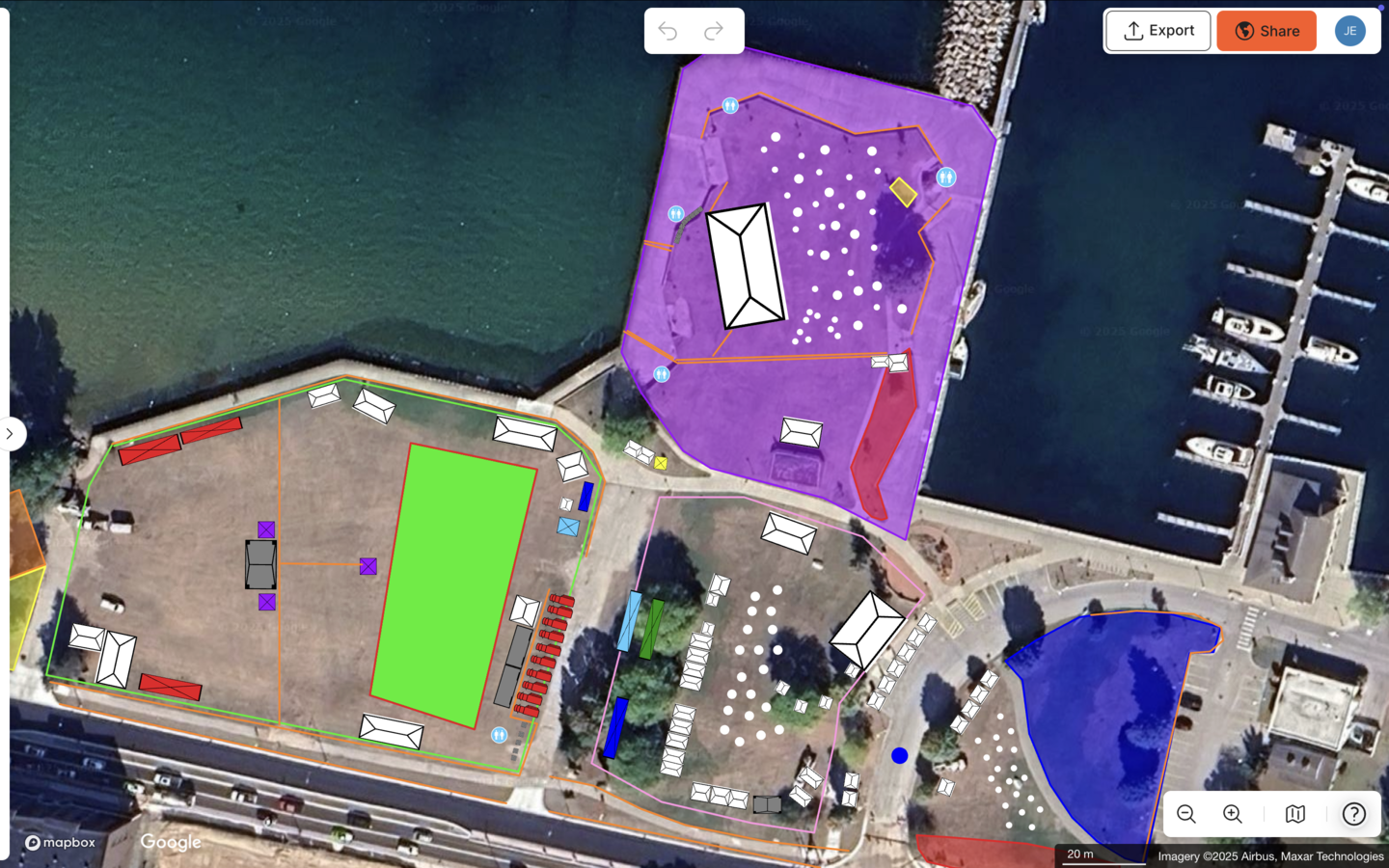
OnePlan works differently. Every object placed on the to-scale, map-based site plan saves automatically to a back-end inventory. Draw a line of crowd barriers and OnePlan calculates exactly how many segments you need. Add gates, sandbags, and windscreen mesh and they appear in the same exportable list. Bearfoot Productions used this approach to accurately calculate and order over 1,000 panels of Heras fencing and 1,500 pedestrian barriers, approximately 8 kilometers of fencing, directly from their OnePlan site map.
OnePlan’s Bill of Quantities tool automatically tallies items placed on a site map and calculates infrastructure needs for sourcing from suppliers, which removes the need to re-key anything into a separate spreadsheet. Festival Foods uses the same BOQ dashboard to calculate and export inventory needs across 11 simultaneous events.
The Orkney 2025 International Island Games team found that OnePlan’s pedestrian barrier calculator feature “was magic” and made ordering much easier for a small team coordinating 15+ venues and 12 sports across multiple islands, without CAD software.
The finished BOQ exports to Excel or CSV, ready to send to suppliers, attach to a permit application, or drop into an existing procurement workflow. The Cheese & Chilli Festival, which runs up to 9,000 attendees across four events per year, notes that OnePlan “provides an accurate to-scale map and hundreds of items of event infrastructure that allows me to quickly build an event site.”
Conclusion
A complete Bill of Quantities for event fencing and crowd barriers covers barrier types, accessories, labor, and a buffer. All of these elements connect to a to-scale site plan that reflects how the event will actually be laid out on the ground. Manual spreadsheets and repeated site visits usually produce the same result: inaccurate quantities, permitting delays, and last-minute re-orders.
OnePlan eliminates the manual spreadsheet process described earlier by generating your BOQ directly from the site map. The inventory is accurate enough for suppliers, detailed enough for permits, and fast enough for small teams. Your first event is free (up to 25 objects), so you can start placing objects on a map within seconds.
Frequently Asked Questions
What is a Bill of Quantities for event fencing, and why do I need one?
A Bill of Quantities is a structured, line-item inventory of every physical item required to fence and barrier an event site, including panels, gates, accessories, and labor hours. It serves three purposes. It gives suppliers a precise order list, it gives your finance team an accurate budget basis, and it gives permitting authorities documented evidence that your site meets safety requirements. Without one, planners often over-order to compensate for uncertainty, or under-order and scramble on event day. A BOQ tied to a to-scale site plan removes both problems by grounding every quantity in an actual measured layout.
How do I calculate how many crowd barriers I need for my event?
Use the calculation method described in the “Calculation Methods and Spacing Formulas” section above. Measure total linear footage, divide by barrier length, and add a 10–20% buffer. For gate quantities, use OnePlan’s free arrival and exit calculators to estimate queue length and exit capacity before finalizing your order.
What accessories should I include in a fencing BOQ?
A complete fencing BOQ goes beyond panels and barriers. Standard accessories include base feet or stands, one per chain link panel, and sandbags, two to four per base depending on ground conditions and wind exposure. You also need clamps and couplers, one pair per panel join, and barrier linking hooks or clips, two pairs per crowd barrier join. Add windscreen or privacy mesh, measured in linear feet for production and backstage areas, single-leaf pedestrian gates for public access points, and double-leaf vehicle gates for emergency access and load-in routes. Labor is also a BOQ line item, with installation crew-hours for delivery, assembly, and positioning, plus dismantle crew-hours for the strike. Leaving any of these out creates budget gaps and supplier confusion.
How does OnePlan generate a Bill of Quantities automatically?
OnePlan is a browser-based, map-based planning platform where every object you place on a to-scale site plan saves automatically to a back-end inventory. When you draw a run of crowd barriers on the map, OnePlan calculates exactly how many segments are needed based on the measured distance. Add gates, sandbags, windscreen mesh, and labor items and they appear in the same inventory. The finished Bill of Quantities exports to Excel or CSV with a single click, ready for suppliers, permit applications, or your procurement workflow, with no re-keying required. Because the BOQ is generated from the map itself, any layout change updates the quantities automatically, so your order list always reflects the current plan.
Do fencing and barrier requirements vary by location, and how should I handle that in my BOQ?
Fencing and barrier requirements vary significantly by location. Fencing height minimums, gate-width requirements, emergency egress ratios, and barrier specifications differ by state, city, and country. Requirements in California, for example, are not the same as those in Texas, New York, or the UK. The sample quantities and formulas in this article are illustrative starting points, not regulatory standards. Always confirm your specific requirements with the relevant local authority, fire marshal, or permitting body before finalizing your BOQ. OnePlan helps by giving you a documented, to-scale site plan and an exportable inventory that you can share with approving bodies, which makes the back-and-forth faster and better evidenced, but the platform is a planning tool, not a regulatory authority.